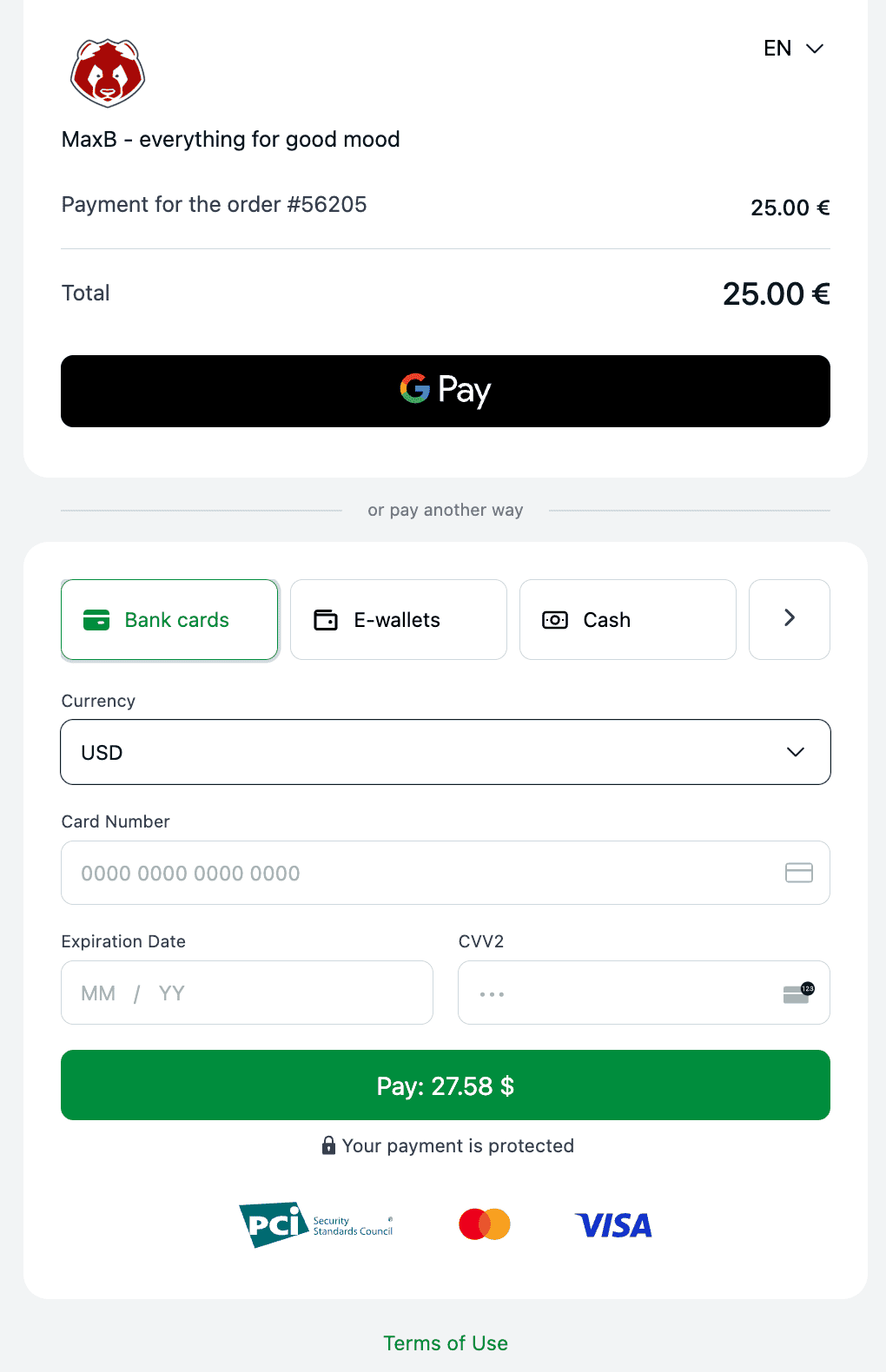
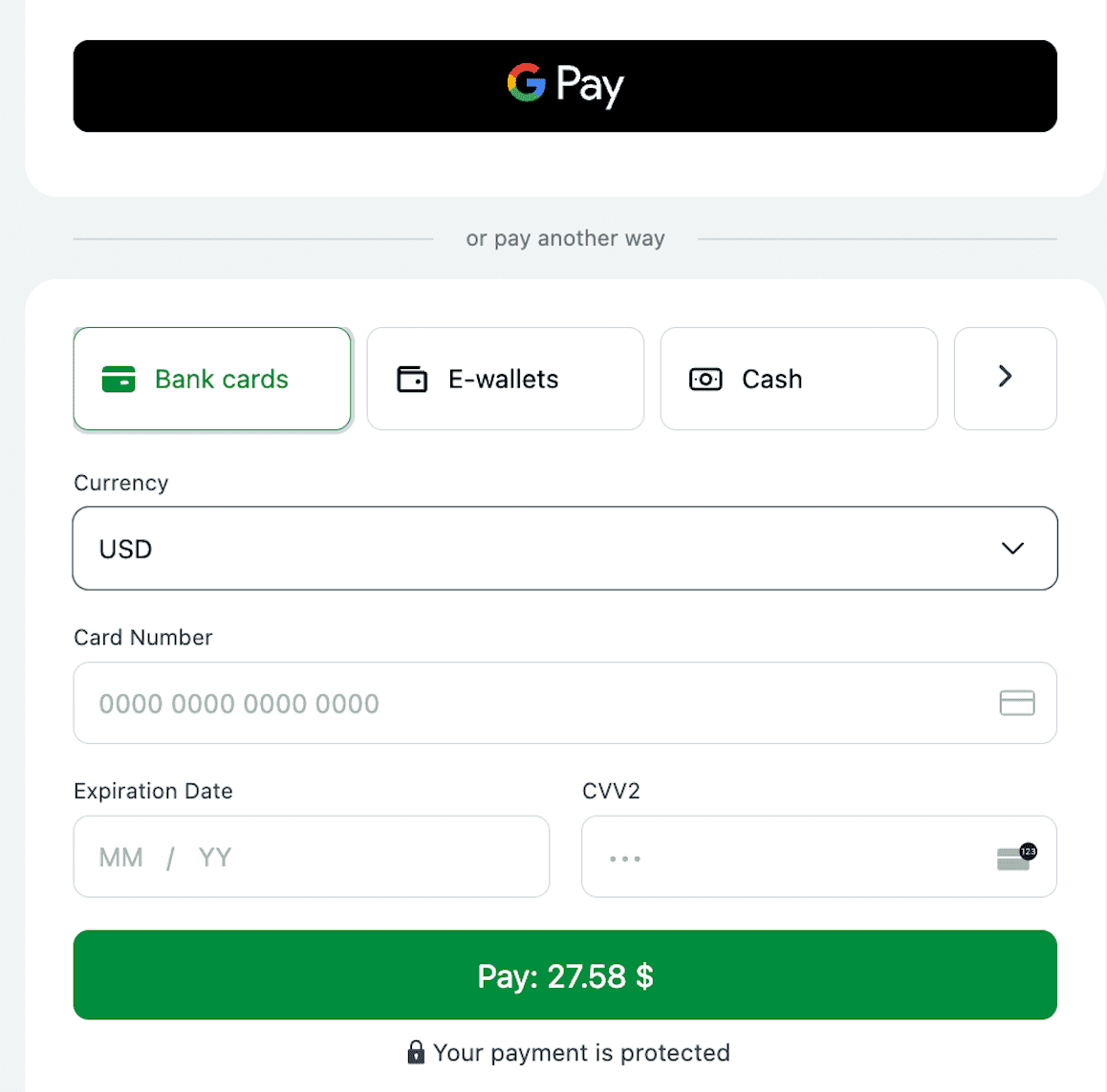
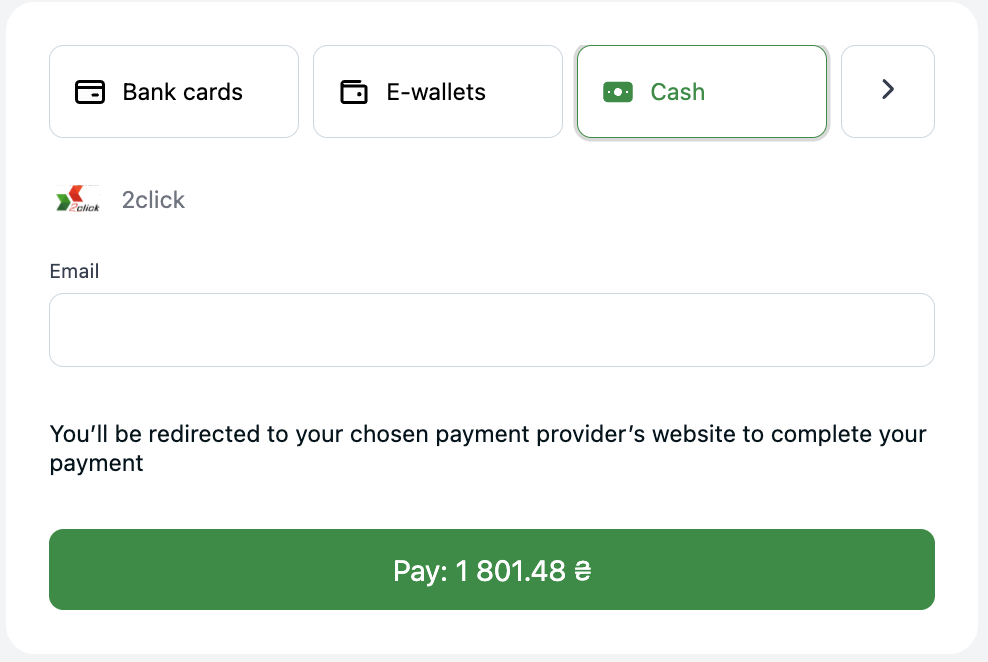
openapi: 3.0.0
servers:
- url: https://api.interkassa.com/v1
description: Default server
info:
title: Interkassa Payment Platform API
version: 1.0.0
contact:
email: support@interkassa.com
x-logo:
url: 'images/interkassa-logo.png'
altText: Interkassa logo
backgroundColor: '#FAFAFA'
description: |
# 1. Introduction
The Interkassa API is constructed upon REST principles, ensuring a robust and consistent interface. Designed with clarity,
the API incorporates intuitive, resource-oriented URLs, adheres to form-encoded request conventions, and consistently
returns JSON-encoded responses. Furthermore, it maintains compliance with established HTTP standards for response codes and
authentication procedures.
### Terminology
- **IK**: A standard abbreviation for Interkassa.
- **Merchant**: Refers to the account holders who utilize Interkassa for processing online payments, typically in exchange
for goods or services through their e-commerce platforms.
- **Client**: The buyer who purchases products or services from the merchant. During the transaction process,
they are directed to the SCI interface for payment completion.
- **Checkout**: The merchant's website page where consumers pay for products or services.
## Integration modes
There are 2 primary modes of payment integration tailored to different merchant needs.
1. `Hosted Payment Page`: In this mode, the payers are redirected to the Interkassa payment page to complete the payment.
On this page, the payer sees complete information about the payment, chooses a convenient payment method, and enters all
required data to complete the payment. You can personalize the appearance of the payment page on the merchant portal -
check the detailed tutorial here.
This mode is usually used to simplify the integration process and reduce the security requirements for your website, as
Interkassa is responsible for processing payment data.
#### Hosted Mode is ideal for merchants who:
- don't have their own payment page and don't want to develop it;
- haven't passed PCI DSS certification;
- don't have the ability to provide card payment methods to the payer.
2. `Host-To-Host Integration`:
In this mode, payment initiation takes place on your website without redirecting to the
Interkassa payment page. To work in this mode, you need to transmit a more extended set of parameters via API. In the case
of card payment methods, the payer enters the card details directly on your website. In the case of alternative payment
methods, the payer will be redirected directly to the page of the payment provider. This method of integration requires a
higher level of security for your website, as you have to provide a secure environment for processing payment data and are
therefore responsible for this process.
#### Host-to-host integration is ideal for merchants who:
- are PCI DSS certified;
- have their own payment page or the form for collecting payer's data;
- want payers to stay on their website as long as possible;
- want to collect additional data about the payment and cardholder;
- want to fully control the payment process.
Both modes have their advantages and disadvantages. The choice between them depends on your business and needs.
# 2. SCI
**SCI (Shop Cart Interface)** is a software interface that allows merchants to facilitate seamless online payment transactions.
The SCI is strategically designed to act as a focal point for online payment gateways. Essentially, clients initiate and complete
their payment via this gateway, post which they are seamlessly redirected back to the originating website. Regardless of the payment
method, it allows interaction with the client and processes payments consistently. Like any other software interface, it has its
interaction protocol, functionality, some requirements, and restrictions. Depending on the integration degree, the protocol allows you
to implement various interaction schemes between you and your client.
## Integration
For effective integration with the Interkassa platform, follow the following procedure:
- [x] **Initial Setup**: Create an account on the Interkassa platform;
- [x] **Strategic Discussion**: Take a survey in your account and discuss with a personal account manager appropriate payment methodologies tailored to your business requirements.
- [x] **Checkout Configuration**: Establish and configure the checkout on your platform.
- [x] **Payment Form Integration**:[Connect the payment form](/#section/3.-Protocol/3.2.-Payment-Request-Form) and [test it](/#section/6.-Testing) in a controlled environment using the designated test payment mode.
- [x] **Website Moderation**: Submit your website for a thorough moderation process to ensure compliance with platform standards.
- [x] **Payment Launch**: Post successful moderation, activate the system to commence [receiving online payments](/#section/3.-Protocol/3.2.-Payment-Request-Form) from clients.
## Interaction
SCI, from an integration perspective, is a web page `https://sci.interkassa.com`. and returns outcomes based on the `ik_act` action
type and `ik_int` interface selection, i.e., web or JSON. Given its flexible architecture, the SCI provides standard solutions below
for various tasks and levels of complexity. Depending on your business type, SCI can be utilized in several ways:
- **Automated Payment Processing**: If your business involves selling goods or services, and you have your own billing system wishing
to automate payments, you'll need to implement logic to process notifications about payments from SCI. Regardless of the payment
method used, it can be Visa, Mastercard, bank transfer, or a self-service terminal, payments are automatically transferred once the
funds are credited to your account.
- **Gateway Redirection Protocol**: If you want to offer your clients a choice of payment method and redirect them straight
to the payment gateway (bypassing the SCI web interface), you can do this. The protocol's inherent support for the JSON interface
ensures encrypted data transfer, enabling backend processing devoid of front-end display to the client.
## The scheme of work
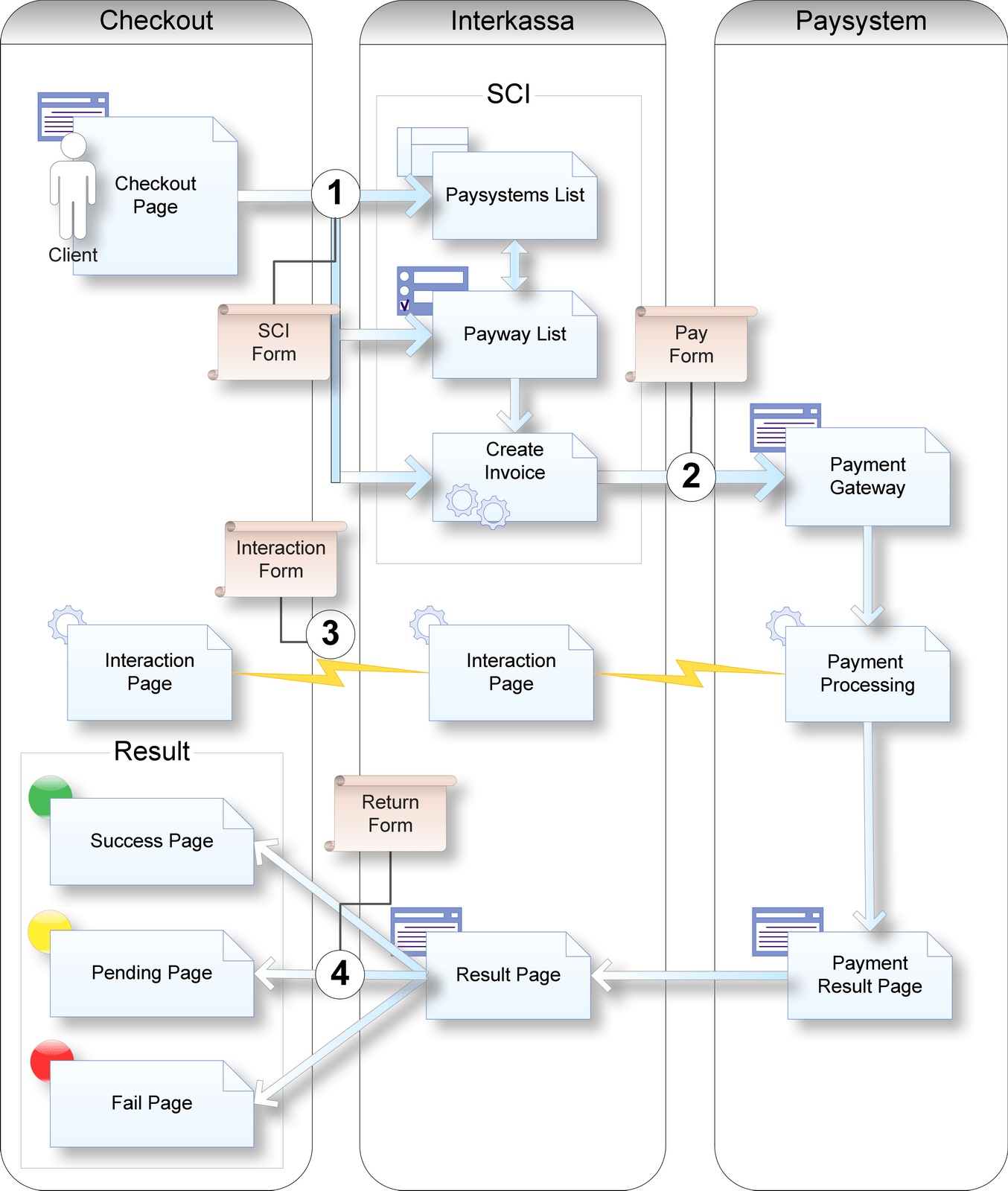
### **Payment Page** or **Checkout**
is a page that displays the payment request HTML form (SCI Form)
### **Payment Systems List**
is a section with payment systems available for this checkout.
### **Payway List**
is a section where users can choose a payment method.
### Create Invoice
is a script that generates an invoice and redirects the client to the payment gateway (Payment Form).
### Payment Gateway
is a technology through which clients make payments.
### Payment Processing
is a script designed to facilitate payment on a payment gateway. When a user completes a payment, the SCI (Interaction Page) server receives a notification about the payment result. The SCI then informs the Interaction Page on the merchant's server about the payment (Interaction Form).
### Payment Result Page
is the page to which the client is redirected after making a payment. It serves as a bridge to the SCI.
### Result Page
is an SCI page where the client is directed after the payment process is completed. The client waits for the SCI result on this page and is then redirected to the Success Page, Fail Page, or Pending Page based on the outcome of the payment.
## Example of the payment process
Let's walk through a typical payment process using an online movie ticket store as an example. The process is designed
to be automated, allowing the customer to receive their ticket immediately after payment.
1. **Selection & Reservation**: The customer selects a movie session and reserves seats. They place an order for the tickets, which is assigned an identification number and total cost.
2. **Initiating Payment**: The customer then navigates to the Checkout Page on the merchant's website. Here, they find a button leading to the SCI payment gateway. This button is linked to an HTML form, which points to the SCI web interface at `https://sci.interkassa.com`. This form contains hidden parameters (see **[Protocol section](#section/3.-Protocol)**) and payment data (amount, order ID, etc).
3. **Navigating to SCI**: By pressing the button, the customer is redirected to the Payment Page - SCI web interface, where they can select from a list of available payment systems (Payment Systems List).
4. **Payment System Selection**: The customer can view payment data, the total amount due, and a description of the payment and select the preferred payment system (Bank cards, E-wallets, Crypto, etc).
5. **Payment Method & Details**: Upon selecting a payment system, the customer is shown the available payment methods (Payway List), asked to enter contact details, and presented with the terms of payment.
6. **Invoice Generation**: When the customer clicks the "Pay" button, a new invoice is generated in the Interkassa system and assigned to the checkout. The customer is then redirected to the payment gateway.
7. **Payment Execution**: The customer completes the payment at the payment gateway.
8. **Transaction Notification**: Upon completion of the payment, SCI receives a notification about the transaction result and forwards it to the merchant's website.
9. **Payment Results**: After payment, the payment gateway redirects the customer to a results page. Here, based on the available data, SCI displays the payment status and redirects the customer accordingly: to the Success Page, Fail Page, or Pending Page.
# 3. Protocol
## 3.1. Checkout Settings
The settings in this section define various properties of the checkout process. These properties are organized under
four categories: Main, Security, Post-Payment Redirection, and Callback. Here is a detailed description of each property:
#### Main Properties
| **Property** | **Description** |
| ----------------- | -------------------------------------------------------------------------- |
| Checkout Name | Displayed on a Payment Page |
| Site URL | The website's URL, shown on the Payment Page |
| Description | A brief description of the checkout, visible on the Payment Page |
| Fee Rate | The Interkassa commission rate is applied when calculating the payment amount |
| Payment No Unique | Checks the uniqueness of the payment number before creating a new one. This feature helps prevent duplicate payments. If payment with the same number (parameter `ik_pm_no`) is found in the checkout billing, the client will see a corresponding error |
| Payment Lifetime | Defines the lifetime (in seconds) of a payment after creation. This property is ignored if the `ik_exp` parameter is set on SCI. By default, it's **2592000** (30 days) |
| Payment Lifetime Override | Allows the **Payment lifetime** property to be overridden by the `ik_ltm` parameter on SCI. Disabled by default |
| Show Logo | Displays the checkout logo on the SCI web interface. Disabled by default |
#### Security Properties
| **Property** | **Description** |
| ----------------- | -------------------------------------------------------------------------- |
| Sign Algorithm | The algorithm used to generate a digital signature. The default is **SHA256**. If you are still using the outdated MD5 algorithm, we recommend you upgrade it to the more secure SHA256 |
| Sign Key | The key used to generate a digital signature |
| Checkout Sign Required | Whether a digital signature is required from the checkout or not. Enabled by default. For more details see [digital signature generation](/#section/3.-Protocol/3.5.-Digital-Signature-Generation) |
#### Post-Payment Redirection Properties
> **Attention!** All the properties below are working in the Hosted Payment Page mode only. To view interaction parameters for Host-to-host mode, please refer to [section 3.3.2 in the Client Redirect Pages](#section/3.-Protocol/3.2.-Payment-Request-Form).
| **Property** | **Description** |
| ----------------------- | -------------------------------------------------------------------------------------- |
| Success Url | The URL received in `ik_suc_u`, used by the Payment Page to redirect the client after a successful payment |
| Success Method | The HTTP method used to request the success page. Set via `ik_suc_m`. Default: `GET` |
| Fail Url | The URL received in `ik_fal_u`, used by the Payment Page to redirect the client after a failed payment |
| Fail Method | The HTTP method used to request the failure page. Set via `ik_fal_m`. Default: `GET` |
#### Callback Properties
| **Property** | **Description** |
| ----------------------- | -------------------------------------------------------------------------------------- |
| Interaction Url | The URL received in `ik_ia_u`, used by the Payment Page to send a notification to the website's checkout about the payment status. For more details, see the **[Payment notification section](/#section/3.-Protocol/3.4.-Payment-Notification)** |
| Interaction Method | The HTTP method used to request the interaction page. Set via `ik_ia_m`. Default: `POST` |
Please ensure you configure these properties appropriately to meet the requirements of your checkout process.
## 3.2. Payment Request Form
```
```
### Payment request parameters
The payment form may also contain additional parameters that affect the available payment methods, the order validity period, the trade interface language, etc. You can see a complete list of the payment form parameters below:
> Please note, that parameters with "*" are mandatory.
#### Payment Parameters
| **Key** | **Format** | **Example** | **Description** |
| --------------- | ----------------- | --------------------- | ------------------------------------------ |
| `ik_co_id` * | /^[\w\-]{1,36}$/D | 4f269503a92c807000002 | Checkout ID. **Required**. For more details see [checkout's settings](/#section/3.-Protocol/3.1.-Checkout-Settings) |
| `ik_pm_no` * | /^[\w\-]{1,64}$/D | ID_4233 | Payment number. **Required**. Used to identify payments in the Interkassa system and link them to your billing orders. The uniqueness is checked if this option is set in the [checkout's settings](/#section/3.-Protocol/3.1.-Checkout-Settings) |
| `ik_cur` * | /^.{3}$/ | EUR | Payment currency. **Required** if checkout has more than one currency. For more details see [checkout's settings](/#section/3.-Protocol/3.1.-Checkout-Settings) |
| `ik_am` * | /^[\d]{1,8}([.,][\d]{1,2})?$/ | 100.43 | Payment amount. **Required** |
| `ik_desc` * | /^.{1,255}$/ | Payment Description | Payment description. **Required** |
| `ik_sign` * | /^.{0,128}$/ | oVAOevI3mWrcvrjBySg== | Digital signature. Mandatory if "Check the signature in the payment request form" (Checkout Sign Required) is set. For more details see [digital signature generation](/#section/3.-Protocol/3.5.-Digital-Signature-Generation)|
| `ik_exp` | /^.{0,30}$/ | 2011-10-01 20:50:33 | Payment expiration date. If the payment is not made within this specified timeframe, it's not accepted. This is particularly useful for time-sensitive, such as online bookings |
| `ik_ltm` | /^[\d]{1,10}$/ | 86400 | Payment lifetime in seconds. However, if the 'Payment Expiration Date' (`ik_exp`) is already set, this parameter is ignored. By default, the 'Payment Lifetime' property in the checkout settings is used. |
| `ik_pay_token` | /[\w/'":;[]{}+=-]{10,}/ | UGF5IHRva2VuIHBhcmFl
cnMgZm9yIGYW1wbGUK | Payment token. Used for recurrent payments or one-click payments. After a successful payment, you can fetch the value for this parameter from the `ik_p_card_token` field in the ['Payment Notification'](/#section/3.-Protocol/3.4.-Payment-Notification) sent to the merchant's server. However, please note that this value might not be accessible across all payment systems. For activation and more detailed information, reach out to us at merchant@interkassa.com. Please remember, the transmission of the [Browser Fingerprint](/#section/9.-Browser-Fingerprint) is **mandatory** when making payments using a token |
| `ik_products` | Array[Product] | | Array of products to be paid. For more details see [checkout's settings](/#section/3.-Protocol/3.2.1.-Product-Details) below |
| `ik_display_amount` | /^[\d]{1,8}([.,][\d]{1,2})?$/ | 1.43 | Equivalent amount. Displays the amount on the payment page for the payer's reference |
| `ik_display_currency`| /^.{3}$/ | EUR | Equivalent currency. Displays the currency in which the amount on the payment page for the payer's reference |
#### Payment Processing Parameters
| **Key** | **Format** | **Example** | **Description** |
| --------------------- | ------------------ | -------------- | ------------------------------------------ |
| `ik_payment_method` | /^[a-z0-9]+$/ | card | Selected payment method. The parameter works only with `ik_payment_currency` |
| `ik_payment_currency` | /^[A-Z]{3,7}$/ | EUR | Selected payment currency. The parameter works only with `ik_payment_method` |
#### Interaction Parameters
| **Key** | **Format** | **Example** | **Description** |
| ----------------- | ---------- | ------------------------------- | ------------------------------------------ |
| `ik_ia_u` | URL | http://www.site.com/interaction | Interaction page URL. The URL used by the Payment Page for sending a notification to the website's checkout about the payment status. For more details see [Payment notification section](/#section/3.-Protocol/3.4.-Payment-Notification) |
| `ik_ia_m` | /post/ | POST | Interaction page request method |
| `ik_suc_u` | URL | GET http://www.site.com/success | Successful payment page URL. The URL used by the Payment Page for redirecting the client after successful payment |
| `ik_fal_u` | URL | GET http://www.site.com/fail | Failed payment page URL. The URL used by the Payment Page for redirecting the client after a failed payment |
#### Protocol Parameters
| **Key** | **Format** | **Example** | **Description** |
| ----------------- | ---------------- | --------------------- | ------------------------------------------ |
| `ik_act` | /process | process | Used to override the initial state of the payment process |
| `ik_int` | /web \| json/ | json | Allows you to specify SCI interface format as "web" or "json". The default is "web" |
| `ik_sub_acc_no` | /^[\w-]{1,32}$/D | User123-ID456 | Payer identifier in Merchant system. |
| `ik_mode` | /invoice | invoice | Mode type. Value "invoice" indicates that the SCI provides you with a link to the Interkassa payment page instead of a direct link to the payment service. The parameter works only with `ik_int=json` |
| `ik_x_[name]` (**deprecated**) | | ik_x_${key} = ${value} | Prefix for additional fields. Used to pass extra parameters to SCI, which are then included in the successful payment notification data |
### Payment form generation
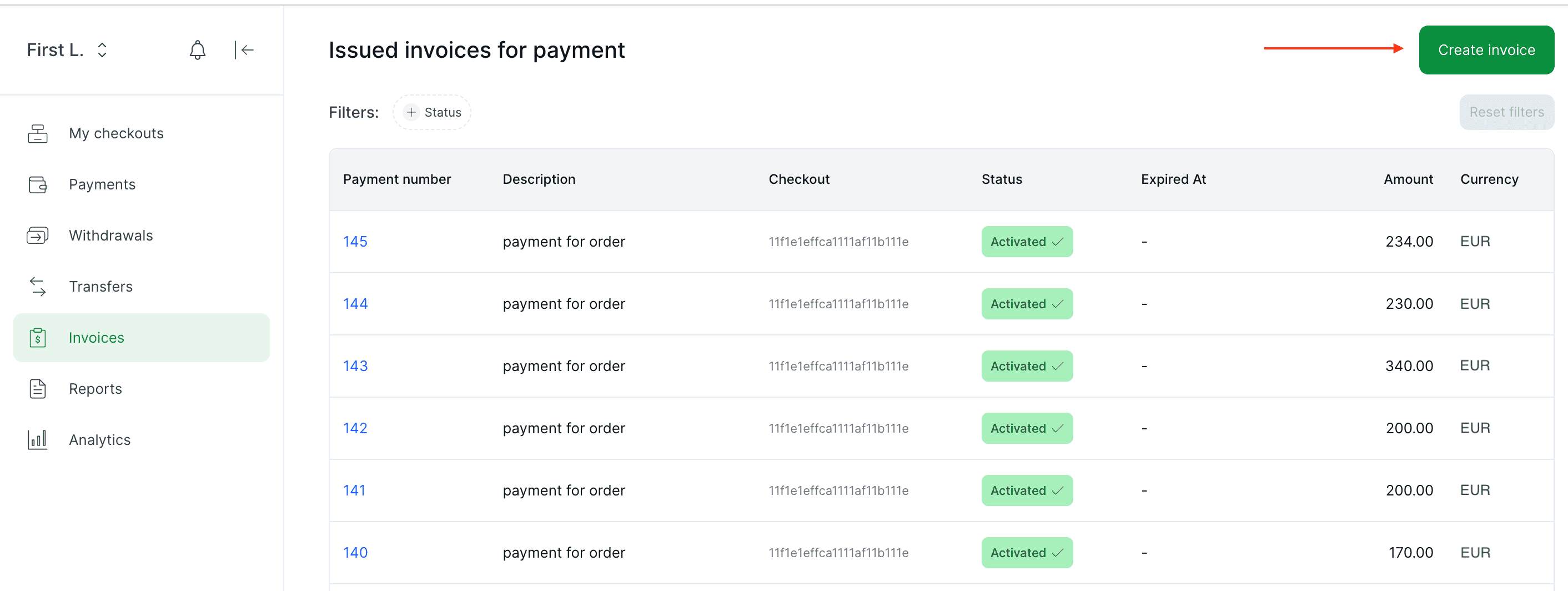
To create a payment form, you can use our payment form generator, which is shown in the image below. For a more detailed tutorial, please, visit our payment form generation guide.
### 3.2.1. Product Details
For each payment, you can optionally pass an array of products that are being paid for.
The table below describes each parameter that can be included in this array.
All parameters are optional
| **Parameter** | **Example** | **Description** |
| ------------- | ------------ | ------------------------------------------------------------- |
| `id` | 1 | Product identifier in the merchant's system |
| `url` | https://site.com/product/tv | Product page URL |
| `category` | TV | Product category |
| `name` | Led TV | Product name |
| `description` | 32 Inch Full Hd Led Tv | A brief description of the product |
| `amount` | 6600 | Product price (doesn't affect total payment amount) |
| `currency` | EUR | Product price currency |
| `price_type` | VAT | Whether the price is a VAT (Value Added Tax) or NET |
| `vat` | 6600 | VAT price for the product |
| `qty` | 1 | Product quantity |
| `payload` | extra product info | Field to include any additional information related to the product. Max 4000 characters |
### 3.2.2 Payer's data
Certain payment methods may require additional information about the payer. Examples of such data fields about the payer are provided below:
| **Parameter** | **Example** | **Description** |
| ------------------------ | ---------------- | ------------------------------------- |
| `ik_customer_email` | mail@mail.com | Payer's email |
| `ik_customer_phone` | 5510000000000 | Payer's phone number |
| `ik_customer_first_name` | John | Payer's name |
| `ik_customer_last_name` | Smith | Surname of the Payer |
| `ik_customer_ip` | 00.00.00.00 | Payer's ip |
| `ik_customer_country` | UA | Payer's country code |
| `ik_customer_state` | AM | Payer's state |
| `ik_customer_city` | Kyiv | Payer's city |
| `ik_customer_address` | Volodimirska Str | Payer's address |
| `ik_customer_post_code` | 000111 | Payer's postal code |
| `ik_customer_document_id`| 88899999911 | Payer's document ID |
| `ik_customer_document_type` | CPF | Payer's document type |
| `ik_customer_referrer` | https://www.x.com | The URL identifying the website that directed the payer to the payment page |
## 3.3. Post-Payment Redirection
Interkassa allows you to configure redirection for the payer after they initialize or complete a payment.
The redirection can point to any web page — your website, a social media profile, a confirmation page, or a custom landing page.
> **Note**: Both integration modes use the `GET` method for redirection.
### 3.3.1. Redirection in the Hosted Payment Page mode
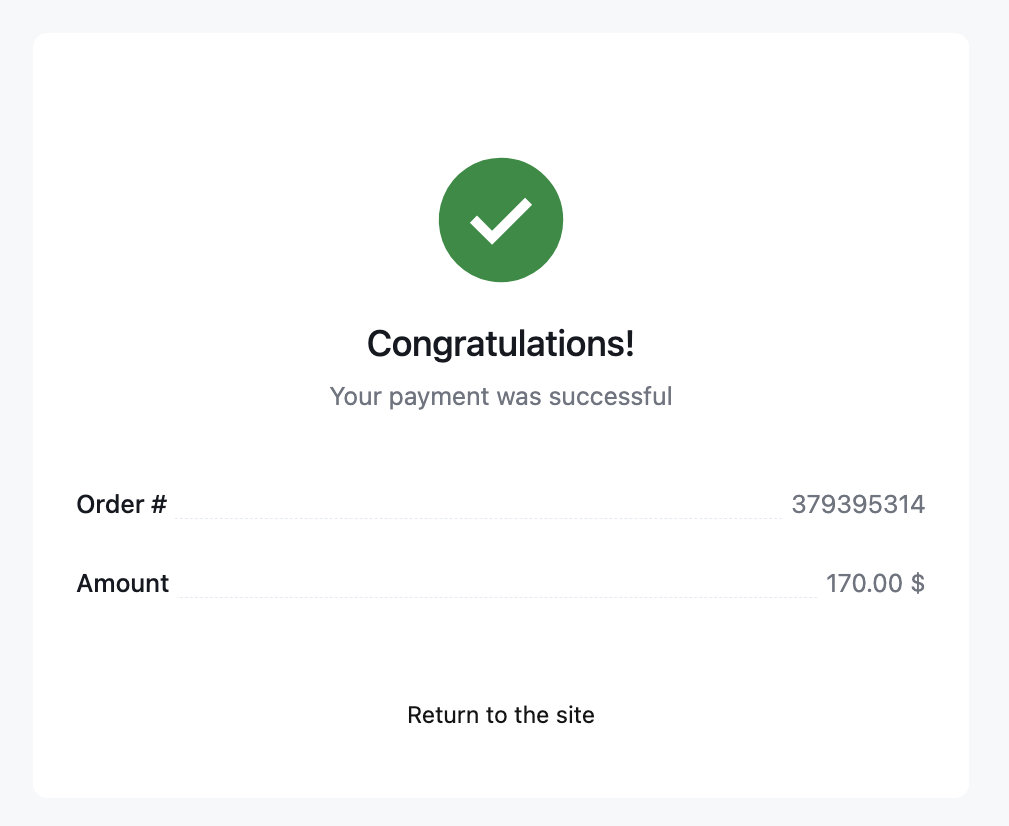
After completing a payment, the payer will see a result page that displays the *success* or *failure* status.
If redirection is configured, a ***Return to the site*** button will appear, allowing the user to return to a designated URL based on the payment result.
#### Configuring Redirection
You can configure redirection in two ways:
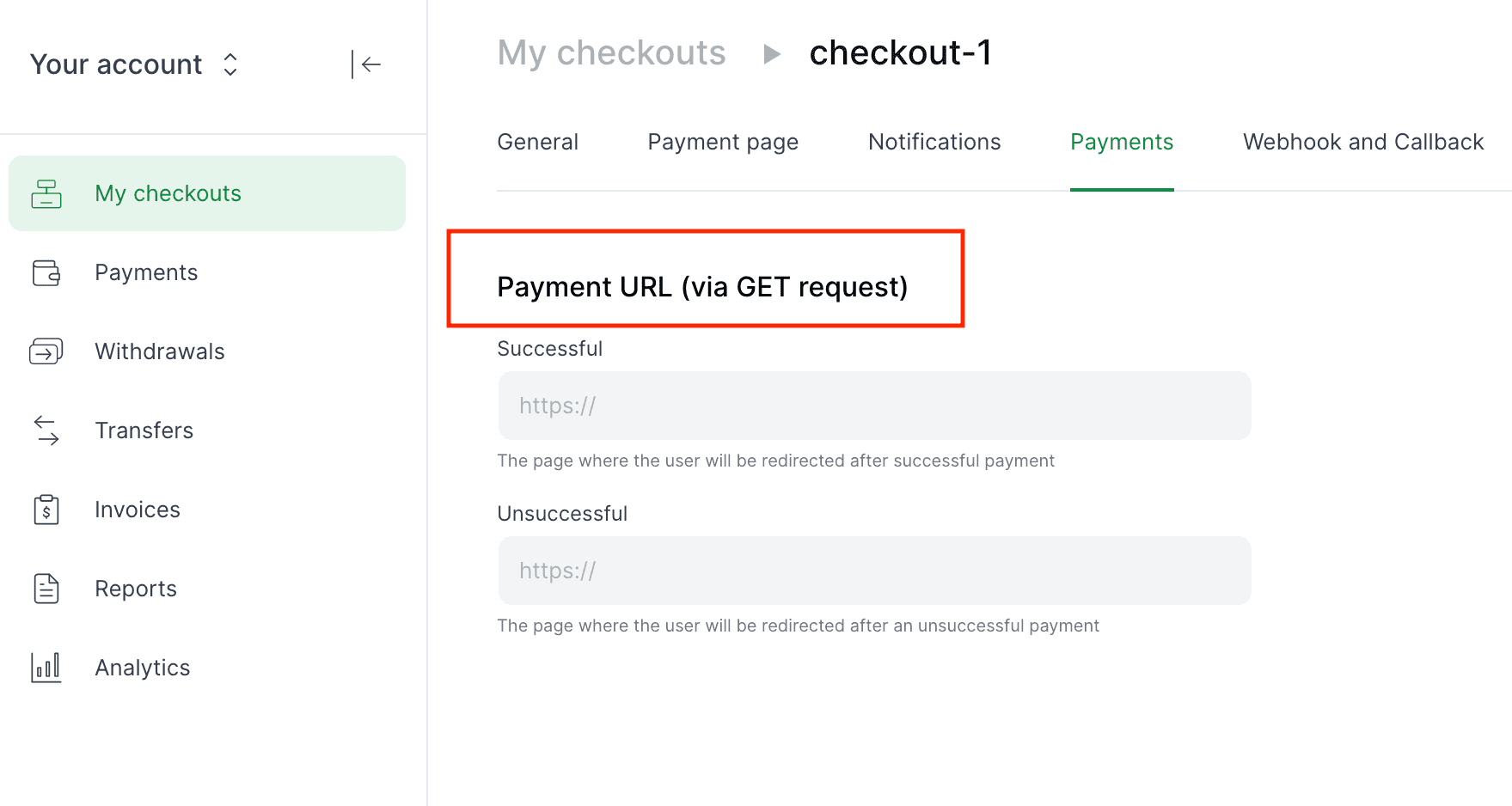
1. **Via the merchant portal**
- Navigate to '**My checkouts**' → '**Settings**' → '**Payments**', and set URLs for successful and failed payments.
2. **Via payment request parameters**
- Include these parameters in your payment request:
- `ik_suc_u` — URL for successful payments
- `ik_fal_u` — URL for failed payments
> **Note**: Parameters in the request override those set in the merchant portal.
#### Redirection Priority Logic
The final redirection link is determined based on the availability of URLs in request and checkout settings. See the table below:
| **Condition** | **Redirection to** |
| ------------------------------------------------------- | ------------------------ |
| URL provided in request and added to the checkout | URL from request |
| URL provided in request, but not added to the checkout | URL from request |
| URL added to the checkout, but not provided in request | URL from checkout |
| No URL added in request and checkout | Redirection doesn't occur; status page doesn't display the ***Return to the site*** button |
### 3.3.2 Redirection in Host-to-Host mode
In Host-to-Host integrations, redirection is executed automatically upon payment completion. The system uses the first available applicable URL based on a defined priority order.
Redirection can occur when the payment status is *success*, *failed* or *pending*.
> **Note**: Depending on your checkout configuration, Host-to-Host redirection follows one of two scenarios. Contact your account manager to confirm which applies to you.
#### Scenario 1
1. Pass your redirect URL in the `ik_result_url` parameter (**recommended**).
2. **Fallback**: If `ik_result_url` is not provided but `ik_pnd_u` is, redirection occurs to the pending URL.
3. **Validation**: If neither is provided, the request fails validation and will not be processed.
> **Tip**: Consider creating a single, universal page to handle all statuses.
#### Scenario 2
You can also combine portal settings and request parameters, exactly as in Hosted Payment Page mode:
- **Portal**: '**My checkouts**' → '**Settings**' → '**Payments**' (success & failure only)
- **Parameters**:
- `ik_suc_u` — URL for successful payments
- `ik_fal_u` — URL for failed payments
- `ik_pnd_u` — URL for pending payments
> **Note**: If no URLs are supplied via either method, the payment fails internal validation.
This mode uses the same redirection logic as the Hosted Payment Page mode.
## 3.4. Payment Notification
Upon payment, the SCI generates a request containing all necessary data for payment processing and sends it to your **Interaction URL**. This mechanism is primarily designed for seamless integration with your site, enabling automation of payment acceptance and order processing. You can see the complete list of parameters below:
| **Key** | **Example** | **Description** |
| --------------------- | ----------- | ------------------------------------------------ |
| `ik_co_id` | 4f269503a1dc807000002 | Checkout ID. Required |
| `ik_pm_no` | ID_4233 | Payment number in the Interkassa billing system. Uniqueness is verified if the checkout setting is enabled |
| `ik_desc` | Description | Description of the payment |
| `ik_payment_method` | visa | Selected payment method. Required |
| `ik_payment_currency` | EUR | Selected payment currency. Required |
| `ik_am` | 100.43 | Payment amount. Required |
| `ik_cur` | EUR | Payment currency. Mandatory if multiple currencies are set in the checkout |
| `ik_act` | process | Action. The value "process" means payment should be credited on the checkout side. |
| `ik_x_[name]` (**deprecated**) | ik_x_${key} = ${value} | Prefix for additional fields. Used to pass extra parameters to SCI, which are then included in the successful payment notification data |
| `ik_sign` | oVAOevI3mWrcvrjB4ySg== | [Digital signature](/#section/3.-Protocol/3.5.-Digital-Signature-Generation) |
| **Additional Parameters** | | | |
| `ik_inv_id` | 12345; 5632156 | Invoice ID or Payment ID |
| `ik_co_prs_id` | 307447812424 | Checkout Purse ID |
| `ik_trn_id` | 14533; ID_4233 | Transaction ID |
| `ik_inv_crt` | 2013-03-17 17:35:33 | Payment creation time |
| `ik_inv_prc` | 2013-03-17 17:36:13 | Processing time |
| `ik_inv_st` | success | [Invoice State](#section/Payment-statuses) |
| `ik_ps_price` | 25.00 | Total amount of payment in the payment system |
| `ik_co_rfn` | 24.94 | The payment amount in the payment system after fee |
> **Attention!** Note: The notification will continuously be sent to your Interaction URL until your server returns a "200 OK" HTTP status code to the SCI.
### Verifying Payment Information
For the security and integrity of payment notifications on the interaction page, follow these verification steps:
1. **Source Verification:** Ensure the payment notification originates directly from Interkassa and hasn't been tampered with:
- Confirm the sender's server (SCI) IP address. Valid IP addresses used by SCI include:
- `34.77.232.58`
- `35.240.117.224`
- `35.233.69.55`
- To confirm both the origin and data's integrity, use a digital signature (refer to the section on **[Generating a Digital Signature](/#section/3.-Protocol/3.5.-Digital-Signature-Generation)**).
2. **Data Verification:** Even if the notification is from the SCI, you must verify the following details in the payment notification:
- **Checkout ID:** The `ik_co_id` parameter should correspond to your checkout ID.
- **Amount:** The `ik_am` parameter should match the order amount you billed.
- **Payment Status:** The `ik_inv_st` parameter should indicate "success."
- **Digital Signature:** Review the `ik_sign` parameter.
## 3.5. Digital Signature Generation
A digital signature in API payments ensures the security and integrity of data transmitted between clients and servers. It confirms the request comes from an authorized user
and that the data has not been altered during transmission. The digital signature is unique for each transaction.
The digital signature is used to verify:
- **payments** - when Interkassa receives the request, it decrypts the digital signature, verifies the information, and makes the payment only if the data matches. Otherwise, the payment is declined.
- **payment callbacks** - you include the digital signature in the payment request, and Interkassa returns it in the callback. Use the signature to verify the callback authenticity (refer [here](/#tag/Callbacks/Callback-Verification) for more details).
- **withdrawal callbacks** - you don't need to include a digital signature in withdrawal requests - Interkassa generates the signature automatically and returns it in the callback. However, you must create the same signature for the withdrawal
to compare with the one received in the callback. It helps ensure that the callback originated from Interkassa and that no one has modified that data.
The digital signature is created by hashing the payment data, which is then encrypted with a secret key.
Only you have access to this key, minimizing fraud and suspicious activity.
### Accessing the Secret Key
You can find the digital signature secret key in the portal. Open the checkout settings and go to the "**Signature Key**" section.

> **Note:** For security purposes, keep the secret key safe and update it annually.
### How to create the Digital Signature
To generate the digital signature for a request:
1. Collect all request parameters:
- For **payments**, use only parameters with the `ik_` prefix (e.g., `ik_payment_method`, `ik_amount`).
- For **withdrawals**, include all request parameters, as they do not use the `ik_` prefix (e.g., `paymentNo`, `amount`).
2. Sort the parameters alphabetically by key.
- If there are multiple fields with similar names, ensure they are sorted in order as well.
3. If any parameter is an array, sort the array values alphabetically.
4. Concatenate all parameter values using the `:` delimiter.
5. Append your secret key to the end of the concatenated string.
6. Generate the hash of the resulting string using the SHA-256 algorithm.
7. Convert the hash to a byte array, then apply Base64 encoding.
#### Example:
```php
ik_sign = Base64(sha256(Implode(Sort(Params) + SecretKey, ':')))
```
> **Notes:**
> - Ensure your hash function returns a byte array, **not** a HEX representation.
> - When generating a signature for Interkassa, always sign the data using **only the secret key**.
> - If data arrives at the interaction URL, you must first remove the `ik_sign` field from the data. Only then can you generate a signature for reconciliation.
### Example
An example of generating a Digital Signature in PHP is shown below
```php
function sortByKeyRecursive(array $array): array
{
ksort($array, SORT_STRING);
foreach ($array as $key => $value) {
if (is_array($value)) {
$array[$key] = sortByKeyRecursive($value);
}
}
return $array;
}
function implodeRecursive(string $separator, array $array): string
{
$result = '';
foreach ($array as $item) {
$result .= (is_array($item) ? implodeRecursive($separator, $item) : (string) $item) . $separator;
}
return substr($result, 0, -1 * strlen($separator));
}
unset($dataSet['ik_sign']); // Delete string with signature from dataset
sortByKeyRecursive($dataSet); // Sort elements in an array by var names in the alphabet queue
$dataSet[] = $key; // Adding secret key at the end of the string
$signString = implodeRecursive(':', $dataSet); // Concatenation values using symbol ":"
$sign = base64_encode(hash('sha256', $signString, true)); // Get sha256 hash as binary view, using generated string and code it in BASE64
return $sign; // Return the result
```
## 3.6. Reasons for payment rejection
Sometimes a payment may fail for various reasons, resulting in a "canceled" status. You can view the reasons for the declined payments in the [merchant portal](https://wiki.interkassa.com/en/personal-account/managing-payments/#reasons-for-payment-rejection) and API response.
This improves the user experience by simplifying error resolution and providing better insights into payer behavior. Below, you'll find reasons for the rejected payments and their codes.
| **Codes** | **Reason descriptions** |
|------------|----------------------------------------------------------|
| 22201 | Transaction rejected |
| 22213 | Missing required input fields |
| 22216 | Invalid amount |
| 22225 | Card expired |
| 22226 | Insufficient funds |
| 22227 | Transaction limit exceeded |
| 22228 | Amount limit exceeded |
| 22229 | Invalid card data |
| 22230 | 3DSecure verification timeout |
| 22231 | Transaction timeout |
| 22232 | Session expired |
| 22233 | Invalid operation |
| 22234 | Invalid input fields |
| 22235 | Invalid configuration. Please, contact technical support |
| 22236 | Transaction rejected by anti-fraud system |
| 22237 | Transaction declined due to blacklist |
| 22238 | Card not supported |
| 22239 | Authorization failed. Please, contact issuer bank |
| 22240 | Transaction rejected. Please, contact issuer bank |
| 22241 | Failed to create transaction |
| 22242 | Transaction declined due to balance limit |
| 22302 | Duplicate order |
## 3.7. Failed payment retry
If you work in Hosted Payment Page mode, you can allow payers to retry if the payment fails.
To enable this feature:
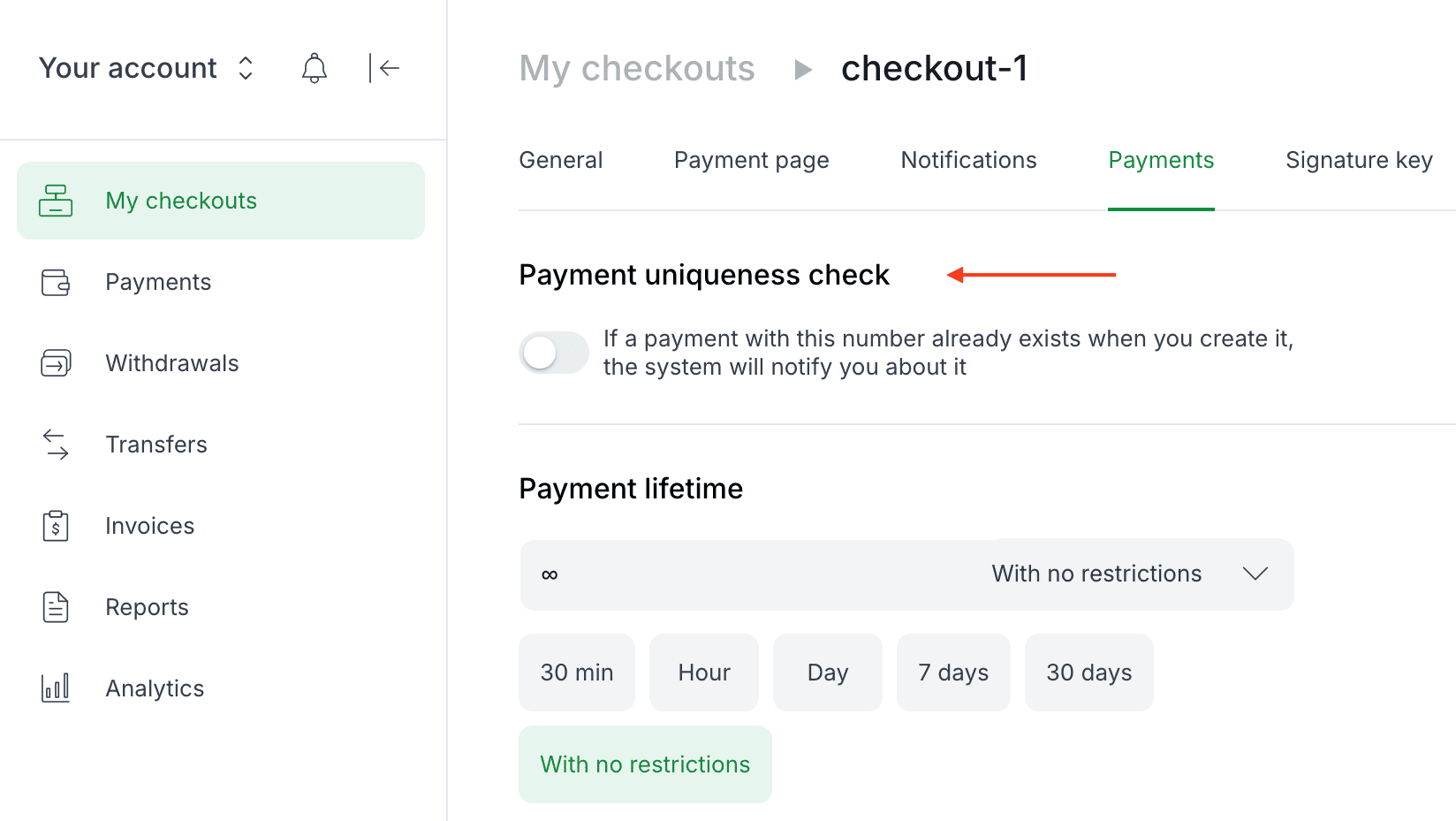
1. Open the **checkout settings** in the merchant portal.
2. Navigate to the '**Payments**' section.
3. **Disable** the **Payment Uniqueness Check** option.
### How It Works
After an unsuccessful payment attempt, the payer is redirected to a status page. If retry is enabled, a ***Try again*** button will be displayed.
When the payer clicks this button, the original payment form is reopened, allowing them to choose a different payment method or enter new payment credentials.
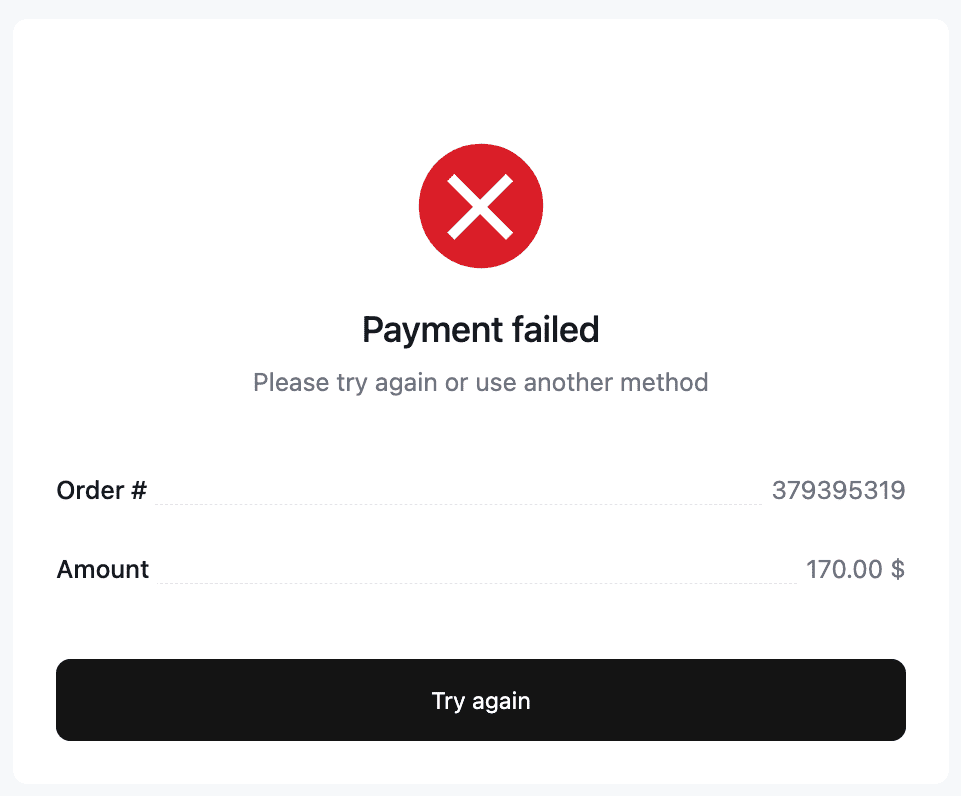
> **Note**: If the **Payment Uniqueness Check** is enabled, the retry option will not be available, and the status page will not display a retry button.
# 4. Advanced Features
## Hidden SCI mode
The Hidden SCI mode facilitates payments via Interkassa by redirecting the customer directly to the payment system's gateway.
This redirection allows your server to secretly capture the HTML form data meant for transactions via the chosen payment gateway.
To activate this, simply utilize the JSON SCI interface by setting the `ik_int` parameter in the payment request form to `json`.
## Fetching Available Payment Directions at Checkout
To retrieve a payment form from the payment system's gateway, set the `ik_act-payways` parameter. Then, make an HTTP request
using either POST or GET methods to the SCI, carrying the payment request form data. This will return a JSON package containing
pertinent payment data. Here's how a typical query might look:
```bash
curl --location --request POST 'https://sci.interkassa.com' \
--header 'Content-Type: application/x-www-form-urlencoded' \
--data-urlencode 'ik_co_id=51237daa8f2a2d8413000000' \
--data-urlencode 'ik_pm_no=ID_4233' \
--data-urlencode 'ik_am=1.44' \
--data-urlencode 'ik_cur=EUR' \
--data-urlencode 'ik_desc=Payment Description' \
--data-urlencode 'ik_act=payways' \
--data-urlencode 'ik_int=json'
```
**Response Example:**
```json
{
"resultCode": 0,
"resultMsg": "Success",
"resultData": {
"paywaySet": [
{
"_id": "50d9ebfd8f2a2dd45d000015",
"als": "test_interkassa_test_xts",
"cur": "50d9eaab8f2a2dd45d000002",
"curAls": "xts",
"in": "507584aff12a6fb80a000005",
"inAls": "test",
"insInId": "53d7aa7bbf4efc29746283f3",
"ps": "interkassa",
"ser": "test",
"srt": 129,
"info": "Use it only for testing",
"financialFlow": "merchant"
}
]
}
}
```
## Retrieving the Payment Cost from a Payment Gateway
To fetch the payment form from the payment system's gateway, ensure you set these parameters:
- Action: `ik_act=payway`,
- Payment method as `ik_payment_method`.
- Payment currency as `ik_payment_currency` (choose any payment method and currency available for your checkout).
After setting these parameters, make an HTTP request to the SCI with the payment request form data using either the POST
or GET method. You'll then receive a JSON package detailing the payment information. Here's a sample query:
**Request example**
```bash
curl --location --request POST 'https://sci.interkassa.com' \
--header 'Content-Type: application/x-www-form-urlencoded' \
--data-urlencode 'ik_co_id=51237daa8f2a2d8413000000' \
--data-urlencode 'ik_pm_no=ID_4233' \
--data-urlencode 'ik_am=1.44' \
--data-urlencode 'ik_cur=EUR' \
--data-urlencode 'ik_desc=Payment Description' \
--data-urlencode 'ik_act=payway' \
--data-urlencode 'ik_int=json' \
--data-urlencode 'ik_payment_method=visa' \
--data-urlencode 'ik_payment_currency=EUR'
```
**Response example**
```json
{
"resultCode":0,
"resultMsg":"Success",
"resultData": {
"invoice": {
"checkoutId":"51237daa8f2a2d8413000000",
"checkoutPurseId":"307447812424",
"paymentNo":"218",
"paywayId":"4f217ec98f2a2d4c0c000318",
"paywayPurseId":"50d828d159d93cfb72000001",
"expired":1385305065,
"coAmount":5,
"coRefund":4.925,
"ikFee":0.15,
"ikFeeIn":0.075,
"ikFeeOut":0.075,
"ikPrice":5.075,
"psAmount":0.4323,
"psFeeIn":0, (deprecated)
"psFeeOut":3,
"psPrice":0.44,
"psExchRate":0.085166
}
}
}
```
## Retrieving the Payment Form from a Payment Gateway
To fetch the payment form from the payment system's gateway:
1. Set the following parameters:
- Action type `ik_act=process`.
- Payment method as `ik_payment_method`.
- Payment currency as `ik_payment_currency` (choose any payment method and currency available for your checkout).
2. Send an HTTP request to the SCI with the payment request form data, using either POST or GET methods.
Upon successful request, you'll receive a JSON package containing the data needed for the payment form.
**Request example**
```bash
curl --location --request POST 'https://sci.interkassa.com' \
--header 'Content-Type: application/x-www-form-urlencoded' \
--data-urlencode 'ik_co_id=51237daa8f2a2d8413000000' \
--data-urlencode 'ik_pm_no=ID_4233' \
--data-urlencode 'ik_am=1.44' \
--data-urlencode 'ik_cur=EUR' \
--data-urlencode 'ik_desc=Payment Description' \
--data-urlencode 'ik_act=process' \
--data-urlencode 'ik_int=json' \
--data-urlencode 'ik_payment_method=visa' \
--data-urlencode 'ik_payment_currency=EUR'
```
**Response example**
```json
{
"resultCode": 0,
"resultMsg": "Success",
"resultData": {
"internalForm": "",
"paywayVia": "test",
"invoice": {
"userId": "103b30188f2a2df810000002",
"coId": "51237daa8f2a2d8413000000",
"coPurseId": "303759535625",
"paymentNo": "ID_4233",
"paywayId": "50d9ebfd8f2a2dd45d000015",
"paywayPurseId": "50d9eb018f2a2d783b000004",
"expired": 1621779998,
"coAmount": 1.44,
"ikPrice": 1.4546,
"psPrice": 1.46
}
}
}
```
# 5. Payment API for PCI DSS merchants
API provides a universal solution for processing alternative and card payments through one URL using Server-Server interaction.
## Additional parameters
> Note that all parameters are **mandatory**!
| **Key** | **Type** | **Name** | **Example** | **Description** |
| ----------------------- | -------- | ---------------- | ---------------- | ---------------------------------------------- |
| `ik_pay_card_number` | string | Card Number | 4242424242424242 | Card number with 16-19 characters |
| `ik_pay_card_cvv` | string | Card CVV | 123 | Card security code |
| `ik_pay_card_exp_month` | string | Expiration Month | 12 | Card expiration Month |
| `ik_pay_card_exp_year` | string | Expiration Year | 25 | Card expiration Year |
| `ik_sign_hmac` | string | Request signature | FbuQtgiowyv6P8E
+3XL4DFUzSvVTRvy
908mtlkb+8Rc= | Digital Signature |
## Required settings and constraints:
1. Provide us with your PCI DSS certificate.
2. All requests should be with the POST method and should contain a `Content-Type: application/x-www-form-urlencoded` header. Request your API URL through the account manager.
3. `ik_int` parameter always should be equal to "JSON".
4. The "Check signature" setting has to be enabled with the sha256 algorithm.
5. Replace the `ik_sign` request parameter with `ik_sign_hmac`
### Generating a Digital Signature (for ik_sign_hmac parameter):
```
'50220d6c1de8e22b1a42a502',
'ik_pm_no' => 'ID_4233',
'ik_am' => 10.50,
'ik_cur' => 'EUR',
'ik_pay_card_number' => '424242424242424242',
'ik_pay_card_exp_year' => '22',
'ik_pay_card_exp_month' => '01',
'ik_pay_card_cvv' => '123',
'ik_desc' => 'test',
'ik_int' => 'json'
];
$key = "sign key from checkout id";
ksort($dataSet, SORT_STRING);
$signString = implode(':', $dataSet);
$sha256hash = hash('sha256', $signString);
$hmac_hash = base64_encode(hash_hmac('sha256', $sha256hash, $key, true));
echo $hmac_hash;
?>
```
The creation of a digital signature requires using a **[Secret key](https://wiki.interkassa.com/en/personal-account/access-to-api/#digital-signature-and-its-secret-key)**. To access it, open the checkout settings and navigate to the "**Signature Key**" section.
> Ensure you copy and securely store this key, as it is essential for making API calls.

### Digital Signature verification
To verify the signature is correct, use the values below:
```
$sha256hash = '3bb2d70e485dbbe7bde2250635c0d5656f586fc025ad89bb1073f3f6af4e0b91'
$hmac_hash = 'xjPx3hIc6fI3imCTf4RV6WFiHuxUFH3mro4eYI7cYL8='
```
# 6. Testing
## 6.1. Creating a payment request form
To simplify the creation of a payment form, we recommend using our payment HTML form generator. This tool allows you to quickly create and customize a payment request form by specifying all the necessary parameters and settings. Additionally, you can test the form to ensure it correctly redirects the client to the payment page through the SCI (Secure Checkout Interface).
## 6.2. Payment process
To test the payment process, we offer a "Test payment system." By default, this payment option is disabled in your checkout settings. However, you can enable it by navigating to the Checkout settings -> Payment systems and activating the "Test payment system" option.
| **Alias** | **Service** | **Gateway** | **Method** | **Currency** |
| ------------------------ | ------------ | ----------- | ---------- | ------------ |
| test_interkassa_test_xts | Test payment | Interkassa | Test | XTS |
> **Attention!** If your checkout is set up and operates in public open mode, you need to disable the "Test payment system" in the checkout settings.
To make a test payment, you just need to select it as a system for payment, and click the "Pay" button or choose another payment action. After that, SCI will redirect you to the appropriate return page on your site.
> **Attention!** When effecting a payment through the "Test payment system", a transaction is not made! Only the state of the invoice issued by you changes, without crediting the payment amount to your balance.
Thus, you can test, in full, the whole process of payment, as well as the processing of the notice of payment (Interaction Form) at your checkout. To do this, use the "test secret key", which is available to you in the settings of the checkout. This key is used to sign the payment notification only through the "test payment system".
> **Attention!** This mechanism, with a "test secret key," prevents a situation where your web application can credit a payment made through the "test payment system", according to the data transmitted to the interaction page (Interaction URL). For this, ALWAYS check the digital signature from SCI.
# 7. Error Codes
| **Code** | **Alias** | **Message** |
| -------- | ------------------------------ | ----------------------------------------------- |
| 102 | E_INVALID_REQUEST_METHOD | Invalid request method |
| 103 | E_REQUEST_IS_EMPTY | Request is empty |
| 107 | E_PARAM_IS_EMPTY | Parameter "%s" is empty |
| 108 | E_PARAM_INCORRECT_FORMAT | Parameter "%s" has incorrect format |
| 109 | E_PARAM_SET_FORBIDDEN | Parameter set "%s" forbidden |
| 110 | E_PAYMENT_NO_NOT_UNIQUE | Payment no "%s" must be unique |
| 115 | E_REQUEST_SIGN_INVALID | Request sign "%s" is invalid |
| 120 | E_CHECKOUT_NOT_FOUND | Checkout "%s" is not found |
| 121 | E_CHECKOUT_UNAVAILABLE | Checkout "%s" is unavailable |
| 127 | E_CHECKOUT_NOT_CREATE_CO_INVOICE | Checkout “%s” can not accept invoices. Please contact technical support |
| 129 | E_PAYWAY_NOT_FOUND | Payway does not exist |
| 604 | CO_INVOICE_E_PAYSYS_PRICE_MAX | Paysystem payment price with convertation [%amount %currency] is over maximum limit [%min_amount %currency] |
| 607 | CO_INVOICE_E_PAYSYS_PRICE_MIN | Paysystem payment price with convertation [%amount %currency] is lower minimum limit [%min_amount %currency] |
| 608 | CO_INVOICE_E_CHECKOUT_FUND | Checkout fund cannot be less or equal zero value. Actual fund is “%s” |
| 900 | API_ERROR | Error creating payment. Try to recreate again. If the error persists - please contact technical support |
# 8. Notes
* Digital signature
* Billing
* List of status HTTP codes
# 9. Browser Fingerprint
A browser fingerprint is a digital signature of the payer's browser environment. It aids in user verification,
especially vital when processing payments through payment systems like Mastercard or Visa. This unique set of
parameters ensures successful navigation through the 3DS 2.0 verification process and helps to deter potential
fraudulent activities.
> **Attention!** If you are using the Host2Host integration for card payment, you must send the Fingerprint along
with the payment request from your side. If the payer is redirected to our host page for card payment, we will
automatically collect the necessary information to pass 3DS 2.0, so you don't have to pass it in the request.
Parameters:
| **Parameter** | **Name** | **Example value** |
| -------------------------------- | ---------------------------- | -------------------------------------------- |
| `ik_browser_color_depth` | Browser's color depth | 24 |
| `ik_browser_ip_address` | Browser's IP address | 127.0.0.1 |
| `ik_browser_language` | Browser's language | uk-UA |
| `ik_browser_screen_height` | Browser's screen height | 1080 |
| `ik_browser_screen_width` | Browser's screen width | 1920 |
| `ik_browser_time_zone` | Browser's time zone | Europe/Kiev |
| `ik_browser_time_zone_offset` | Browser's time zone offset | -120 |
| `ik_browser_java_enabled` | Browser's java enabled | false |
| `ik_browser_java_script_enabled` | Browser's javascript enabled | true |
| `ik_browser_accept_header` | Browser's accept header | text/html,application/xhtml+xml,
application/xml;q=0.9,image/webp,
image/apng,/;q=0.8 |
| `ik_browser_user_agent` | Browser's user agent | Mozilla/5.0 (Windows NT 6.1; Win64; x64) AppleWebKit/537.36 (KHTML, like Gecko) Chrome/88.0.4324.146 Safari/537.36 |
tags:
- name: Introduction
description: |
Interkassa provides a convenient way for external developers to interact with our services through software. This is
accomplished using our REST API, which offers a set of functions for HTTP-based interaction. By utilizing these functions,
you can initiate funds withdrawals, access payment direction information, retrieve exchange rates, and gather specific
account details within the Interkassa system.
The API functions are categorized as public or private. The last ones require an Interkassa account that is authorized for API access.
Currency is the only feature with public access. The list of private features includes the information on the following endpoints:
- **[account](#tag/Account)**
- **[checkout](#tag/Checkout)**
- **[purse](#tag/Purse)**
- **[co-invoice](#tag/Co-invoice)**
- **[refund](#tag/Refund)**
- **[transfer](#tag/Transfer)**
- **[withdrawal](#tag/Withdrawal)**
## API Endpoints
Interactions with the API are performed through GET or POST requests, utilizing UTF-8 encoding.
The base URL for the API endpoint is `https://api.interkassa.com/v1/[resource]`. For GET requests, the parameters should
be URL encoded.
According to REST principles, a GET request to `https://api.interkassa.com/v1/[resource]` will return a list of requested resources,
while `https://api.interkassa.com/v1/[resource]/[id]` will return a resource with the specified identifier.
## Response Format
Every response from the Interkassa server includes the status and code fields. The status field represents the response status,
and the code field contains the corresponding numeric code. When the response status is "ok" and the code is 0, it indicates a
successful request. The response data will be provided in the data field. Conversely, if the response status is "error",
it means an error occurred during request execution. In such cases, the code field will contain the error code, and the additional
message field will provide a verbal description of the error.
> **Note**: During funds withdrawal, if the status is "ok" and the code is 43101, it means the withdrawal was successfully created
in Interkassa but has not been processed by the payment system yet.
## Endpoint Overview
Our API v1 includes a comprehensive set of endpoints designed for managing accounts, checkouts, wallets,
invoices, refunds, transfers, withdrawals, and callbacks.
- name: Authorization
description: |
Authorization is required for accessing private API functions. To enable API functions for your account in the
Interkassa system, ensure that your account is registered and authenticated. By default, API functions are already
enabled.
## IP configuration
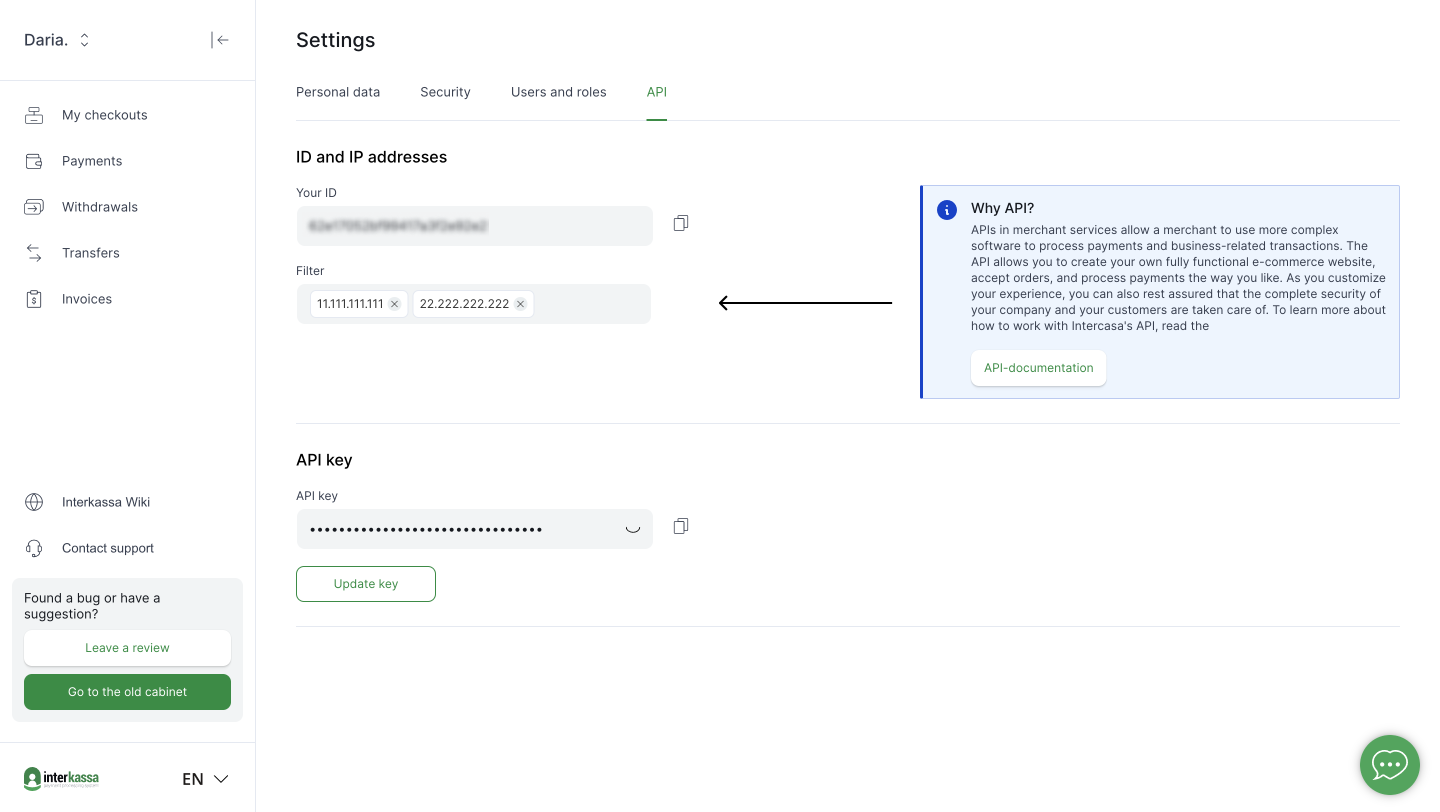
To begin using the API, you need to add your IP address to the IP filter field in your account settings.
Here's how you do it:
1. **Login** to your Interkassa account.
2. **Navigate** to the user settings by clicking on your profile name.
3. Switch to the **API tab**.
4. Here, you'll find the **Filter field**. Enter the IP address from which you'd send requests.
## Authentication credentials: User ID & API Key
Every API call to Interkassa requires authentication, which is facilitated using a combination of a **user ID** and an
**API key**. The user ID is a unique identifier for your account. Here's how to retrieve them:
1. Once logged in, go to your **account settings**.
2. Access the **API tab**.
3. Here, your **user ID** will be visibly displayed. Right next to it, you can generate the **API key**.
It's crucial to copy and securely store this information, as you'll require it for all API calls.

## Authentication rules
This method utilizes your **User ID** and **API Key**. Each API request must carry the "Authorization" HTTP header.
This header comprises the word "Basic", followed by a space, and then the BASE64 encoded pair `userID:APIkey`.
This globally accepted method guarantees secure transmission of your credentials.
Also, to work with account resources, you must pass the business account identifier in the HTTP header
`Ik-Api-Account-Id` (find more details in the [**Account section**](#tag/Account)).
- name: Statuses
description: |
> **Note**: If you received any undescribed statuses, contact our support team at support@interkassa.com.
## Payment statuses
This table defines the various statuses that a payment can have within the system, along with their descriptions and finality.
| **Code** | Status_name | **Description** | **Finality** |
| --------- | ------------ | ----------------------------------------------- | ---------------- |
| 0 | new | New payment | No |
| 2 | wait_accept | The invoice is awaiting the payment | No |
| 3 | process | Processing by payment system | No |
| 4 | chargeback | Processing the chargeback by the payment system | No |
| 5 | expired | Payment expired | Yes |
| 6 | refunded | Payment refunded | Yes |
| 7 | success | The invoice is enrolled | Yes |
| 8 | canceled | The payment was canceled by the system | Yes |
| 9 | chargebacked | The payment was chargebacked by payment system | Yes |
| 10 | refund | Payment system is processing chargeback | No |
| 11 | partial_refunded | Partially refunded | No |
| 14 | blocked | Payment blocked | No |
| 15 | on_review | Payment is under internal review | No |
| 16 | corrected | The operation's status or amount was modified | Yes |
## Withdrawal statuses
The table below explains the various withdrawal states within the system. Each state has a distinct description and indicates whether it's final or not.
| **Code** | **Status name** | **Description** | **Finality** |
| --------- | ------------ | ---------------------------------------------- | ---------------- |
| 0 | new | New withdrawal | No |
| 1 | wait_accept | Pending moderation check | No |
| 2 | invoke | Approved by moderation | No |
| 3 | revoke | Retracted by moderation | No |
| 4 | hold | Withdrawal is temporarily frozen | No |
| 5 | unhold | Withdrawal has been unfrozen | No |
| 6 | process | Payment system is processing the withdrawal | No |
| 7 | enroll | Funds have been credited | No |
| 8 | success | Withdrawal successfully completed | Yes |
| 9 | canceled | Withdrawal request was canceled | Yes |
| 10 | chargeback | Funds awaiting to be returned | No |
| 11 | chargebacked | Funds have been returned to the wallet | Yes |
| 12 | check | Withdrawal has been initiated in the payment system but hasn't been processed yet | No |
| 20 | limitExceeded | The withdrawal limit exceeded | Yes |
## Transfer and System Operation statuses
This table outlines the various statuses that a transfer or system operation can hold, along with their respective descriptions.
| **Status** | **Description** | **Finality** |
| ---------- | ------------------------------------------------------------------ | -------------- |
| New | The transfer or system operation is new and is yet to be processed | No |
| Success | The transfer or system operation has been successfully completed | Yes |
| Canceled | The transfer or system operation was canceled | Yes |
- name: Currency
description: |
Currency operations in the Interkassa API provide important currency details necessary for financial transactions.
They encompass fetching a list of available currencies and information about them.
These operations serve as fundamental building blocks for executing transactions within the system.
They ensure correct and updated currency data is used, contributing to the system's efficiency and accuracy.
You can find some of the currency codes below. The current information on available currencies is also available on the Interkassa wiki.
| **ID** | **Name** | **Character code** |
| ------ | --------------------- | ------------------ |
| 10 | Euro | EUR |
| 20 | Dollar | USD |
| 80 | British pound sterling | GBP |
| 60 | Gold (one troy ounce) | XAU |
> **Note**: these operations only retrieve information, they do not modify any data within the system.
Always ensure to use the correct and updated currency ID for other operations like making a payment.
- name: Account
description: |
Account endpoints provide a powerful interface for interacting with user account data. The ` GET /account` endpoint allows
to retrieve all accounts (client and business) that belong to the merchant. For more granular operations, the
`GET /account/{account_id}` endpoint provides detailed information for a specific account identified by the given account ID.
These endpoints are essential for account management, including user profiling, account updates, and system monitoring.
In the response, you'll see the list of accounts, including a Business one. The business account identifier is required to
fill the HTTP header **Ik-Api-Account-Id**, you need to save it.
- name: Checkout
description: |
The Сheckouts endpoints allow users to manage and get information about their accounts' checkouts.
Checkouts are essentially transaction channels linked to a user's account. Users can have multiple checkouts
per account. Each checkout has a unique ID and associated settings that determine its behavior and characteristics.
In this section, you can retrieve a list of all checkouts linked to your account, or get detailed information about a
specific checkout using its unique ID. For each checkout, the API provides information such as its status, the count
of operations (like invoices and withdrawals) associated with it, the currencies enabled, and various settings like
main settings, invoice settings, action settings, and notification settings.
- name: Purse
description: |
This API allows you to interact with purses (wallets) linked to your merchant account. You can retrieve the
list of all purses, specific purse data based on its ID, and the list of purses for a particular checkout or currency.
The response also shows data on the different types of purse balances.
> **Tip**:
> - The available purse balance you can withdraw is calculated using the following formula: `balance` - `blockedAmount` = **available balance**
> - The **frozen balance** determines the amount of withdrawals in process. It's immediately deducted from the total balance without affecting your available balance.
- name: Co-invoice
description: |
The Co-invoice API provides access to the invoice details made through your checkout. Each invoice includes various
parameters such as its unique identifier in the Interkassa system, creation time, and payment status in the
`stateName` field.
**[Please, check possible invoice statuses here](#section/Payment-statuses)**
- name: Refund
description: |
This API functionality allows you to make a full or partial refund of a previously paid payment. It has restrictions on the method
by which the payment was made - at the moment, refunds are possible for **bank card payments** only.
- name: Transfer
description: |
The Transfer API enables the movement of funds between 2 purses. You can think of it as a simple way to send and receive money.
> Before utilizing this functionality, please, reach out to your manager or our support team at support@interkassa.com to enable this feature.
Once this feature is enabled, you can start making transfers, check their costs, and look at past transfers. Transfers with Interkassa are always safe and clear. Each one has a unique ID, so you can find and track them.
There are three types of transfers:
- between two merchants (MM),
- from the system to a merchant (SM),
- from a merchant to the system (MS).
This helps you understand who's sending and receiving money.
> **Note**: by default, the API filters transfers according to the **accountId** parameter.
**[Please, check the possible statuses here](#section/Transfer-and-System-Operation-statuses).**
- name: Withdrawal
description: |
Withdrawal API offers various endpoints to manage financial transactions. It allows you to list all withdrawals,
create new ones, and retrieve details of specific withdrawals based on ID or number in the merchant's billing system (`paymentNo`).
Responses are in a structured JSON format, and the API includes mechanisms for handling network or internal errors.
This Withdrawal system is a component of our larger financial infrastructure, optimized for smooth integration and proficient
management of withdrawal operations.
If a withdrawal action is successful, Interkassa responds with a set of data fields. These fields encompass details about the
withdrawal, which include Interkassa's unique identifier and its current status, labeled as "state".
> **Note**: During funds withdrawal, if the status is "ok" and the code is 43101, it means the withdrawal was successfully created
in Interkassa but has not been processed by the payment system yet.
> A non-final status indicates that the associated operation is still being processed by an external provider.
**[Please, check possible withdrawal statuses here](#section/Withdrawal-statuses)**.
## Withdrawal endpoint implementation
For implementing the withdrawal endpoint on your side it is necessary to do a few steps:
1. **Enable REST API Access:** Ensure your account is set up to utilize the REST API.
2. **Generate API Key:** Within account settings, navigate to the API section. Here, generate an API key and establish IP filter settings. For more guidance on this, consult the [**Account section**](#tag/Account)) of the documentation. It's imperative to securely store both the key and the `UserId` within your system, as they're essential for making requests to the Interkassa platform.
3. **Fetch Business Account ID:** Make a request to the account resource, ensuring you include the HTTP Authorization header. Once you obtain the business account ID, save it within your system. Future requests will require this ID in the HTTP header labeled `Ik-Api-Account-Id`.
4. **Retrieve Purse Information:** Access data related to purses linked to the account using the purse resource. This will provide details such as purse numbers and their respective balances. Ensure you include the HTTP Authorization headers and `Ik-Api-Account-Id` in your requests. It's recommended to periodically fetch purse data to maintain an updated balance in your system.
5. **Initiate a Withdrawal:** To create a withdrawal, furnish the necessary HTTP Authorization headers and `Ik-Api-Account-Id`. Then, dispatch a request to the [`POST /withdraw`](#operation/createWithdrawal) endpoint. Ensure the body of your request contains all the required parameters.
6. **Withdrawal Confirmation:** If processed successfully, the withdrawal will be recorded in the Interkassa system.
7. **Status Update (Optional):** If you're tracking withdrawals within your system and wish to update their status, utilize the [`GET /withdraw`](#operation/getAllWithdrawals) endpoint. When making this request, include the withdrawal ID associated with the Interkassa system. For accuracy and data integrity, it's advised to store the withdrawal ID in your system.
8. **Error Handling:** If the withdrawal creation request failed (network error or an Interkassa-specific error), you can fetch withdrawal details using the `paymentNo` parameter at this URL: `https://api.interkassa.com/v1/withdraw?paymentNo=[paymentNo]`. If no withdrawal is associated with the provided `paymentNo`, the response won't include a data field.
- name: Callbacks
description: |
Callbacks operate as automated messages sent from one application to another when specific events occur.
In payment processing, they play a crucial role by notifying systems of real-time payment events without manual
checking.
> **Attention!** The notification will persistently be sent to your Interaction URL until your server responds
with a `200 OK` HTTP status code. However, if you need to use a different code to say 'OK,' just let your manager or our
support team know, and we can change it for you. The notification system will attempt delivery **13 times** before removing
the message from the queue.
> **Note!** Please be aware that if your setup utilizes HTTP, webhooks will not be sent. **For the secure transmission
> of callbacks, your endpoint must support HTTPS.** This requirement ensures the integrity and confidentiality of the data being
> exchanged.
> **Note!** If no callback is received within 30 minutes, switch to active status polling with **exponential backoff** and continue until the operation reaches a **final status**.
You can receive callbacks on:
- [payments](#section/Payment-Callbacks)
- [withdrawals](#section/Payment-Callbacks)
- [refunds](#section/Refund-Callbacks).
### Setting up the callbacks
You can configure callbacks in two ways:
1. **Via the merchant portal**
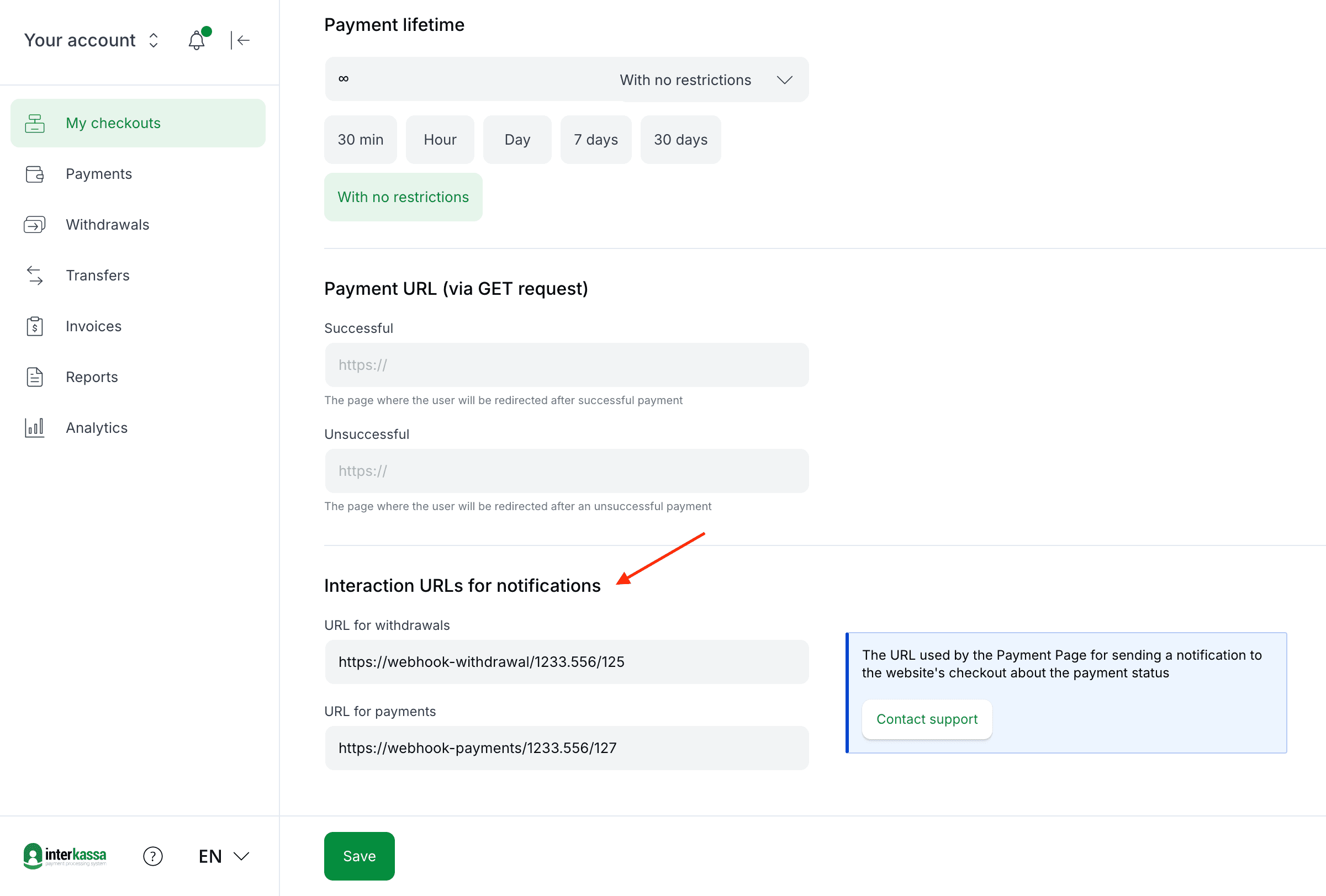
Navigate to the '**Payments**' section in your checkout settings and add **Interaction URLs** to start receiving automatic notifications about transactions:
- `URL for payments` (Interkassa will use this address to send callbacks on payments and refunds).
- `URL for withdrawals`.
2. **Via withdrawal request parameter**
Include `interactionUrl` parameter that suitable for *Success* and *Canceled* operation status.
> **Note**: Parameter in the request overrides those set in the merchant portal.
> Please be aware that Interkasa will only send callbacks to a protected HTTPS URL, ensuring a secure data exchange.
Check [this tutorial](https://wiki.interkassa.com/en/personal-account/configure-notifications/webhook-and-callback/) to find more details.
## Payment Callbacks
These structures contain various parameters that provide detailed information about the payment transaction.
### Success Status Structure
```bash
curl --location -g --request POST 'https://sci.interkassa.com' \
--header 'Content-Type: application/x-www-form-urlencoded' \
--data-urlencode 'ik_payment_method=card' \
--data-urlencode 'ik_payment_currency=EUR' \
--data-urlencode 'ik_cur=EUR' \
--data-urlencode 'ik_co_id=63c1058f418de0000002d0f0' \
--data-urlencode 'ik_co_prs_id=370000096' \
--data-urlencode 'ik_inv_id=568704592' \
--data-urlencode 'ik_inv_st=success' \
--data-urlencode 'ik_inv_crt=2023-11-01 17:42:47' \
--data-urlencode 'ik_inv_prc=2023-11-01 16:42:58' \
--data-urlencode 'ik_trn_id=92000025' \
--data-urlencode 'ik_pm_no=1' \
--data-urlencode 'ik_am=50' \
--data-urlencode 'ik_co_rfn=48.0000' \
--data-urlencode 'ik_ps_price=50' \
--data-urlencode 'ik_desc=payment3' \
--data-urlencode 'ik_customer_last_name=Dou' \
--data-urlencode 'ik_customer_first_name=John' \
--data-urlencode 'ik_sign=6ENy92FMl8rSkA9Fdwl/A6hhl2px000000000iBsFlM=' \
```
### Callback Parameters
| Key | Type | Description | Example | Req'd |
|----------------------|-----------|-----------------------------------------------------|---------------------|:-----:|
| `ik_payment_method` | String | Payment method | card | ✅ |
| `ik_payment_currency`| String | Payment currency | EUR | ✅ |
| `ik_cur` | String | Payment currency in which the payment will be made | EUR | ✅ |
| `ik_co_id` | String | Checkout ID | 4f269503a12c000002 | ✅ |
| `ik_pm_no` | String | Unique payment number in your system | ID_4233 | ✅ |
| `ik_desc` | String | Payment description | Payment 123 | |
| `ik_am` | Float | Payment amount | 100.43 | ✅ |
| `ik_customer_[name]` | String | Additional parameters required by the payment system | Dou | |
| `ik_x_[name]` (**deprecated**) | String | Prefix for additional parameters | John | |
| `ik_sign` | String | [Digital signature](/#section/3.-Protocol/3.5.-Digital-Signature-Generation) | oVAOevB4jdhfkj/ySg= | ✅ |
| `ik_inv_id` | String | Invoice ID | 12345 | ✅ |
| `ik_co_prs_id` | String | Wallet ID | 307447812424 | ✅ |
| `ik_trn_id` | String | Transaction ID | ID_4233 | ✅ |
| `ik_inv_crt` | String | Payment creation time | 2023-11-01 17:42:47 | ✅ |
| `ik_inv_prc` | String | Processing time | 2023-11-01 16:42:58 | |
| `ik_inv_st` | String | [Invoice state](#section/Payment-statuses) | success | ✅ |
| `ik_ps_price` | Float | Total amount in payment system | 25.00 | |
| `ik_co_rfn` | Float | Payment amount in the payment system after fee | 24.94 | ✅ |
### Canceled Status Structure
The parameters in the canceled status structure are similar to those in the success status structure, providing consistency in data representation.
The main difference is that the canceled payment callback includes two additional parameters that specify codes and reasons for payment rejection. See the example below.
```bash
curl --location -g --request POST 'https://sci.interkassa.com' \
--header 'Content-Type: application/x-www-form-urlencoded' \
--data-urlencode 'ik_payment_method=card' \
--data-urlencode 'ik_payment_currency=EUR' \
--data-urlencode 'ik_cur=EUR' \
--data-urlencode 'ik_co_id=63c1058f418de0000002d0f0' \
--data-urlencode 'ik_co_prs_id=370000096' \
--data-urlencode 'ik_inv_id=568704592' \
--data-urlencode 'ik_inv_st=canceled' \
--data-urlencode 'ik_inv_cancel_code=22203' \
--data-urlencode 'ik_error_desc=Unknown error' \
--data-urlencode 'ik_inv_crt=2023-11-01 17:42:47' \
--data-urlencode 'ik_inv_prc=2023-11-01 16:42:58' \
--data-urlencode 'ik_trn_id=92000025' \
--data-urlencode 'ik_pm_no=1' \
--data-urlencode 'ik_am=50' \
--data-urlencode 'ik_co_rfn=48.0000' \
--data-urlencode 'ik_ps_price=50' \
--data-urlencode 'ik_desc=payment3' \
--data-urlencode 'ik_customer_last_name=Dou' \
--data-urlencode 'ik_customer_first_name=John' \
--data-urlencode 'ik_sign=6ENy92FMl8rSkA9Fdwl/A6hhl2px000000000iBsFlM=' \
```
### Callback Parameters
| Key | Type | Description | Example | Req'd |
|----------------------|-----------|-----------------------------------------------------|---------------------|:-----:|
| `ik_inv_cancel_code` | Integer | Internal code for payment rejection reason | 22203 | ✅ |
| `ik_error_desc` | String | Rejection reason description | Unknown error | ✅ |
Please find descriptions of other parameters [above](/#section/Payment-Callbacks).
## Withdrawal Callbacks
This section outlines the structure of withdrawal callbacks and describes the parameters that define it.
### Success Status Structure
```bash
curl --location -g --request POST 'https://sci.interkassa.com' \
--header 'Content-Type: application/x-www-form-urlencoded' \
--data-urlencode 'id=12345' \
--data-urlencode 'purseId=307447812425' \
--data-urlencode 'paymentNo=4233' \
--data-urlencode 'state=success' \
--data-urlencode 'created=2023-11-01' \
--data-urlencode 'processed=2023-11-01' \
--data-urlencode 'payerWriteoffAmount=1000.00' \
--data-urlencode 'payeeReceiveAmount=1000.00' \
--data-urlencode 'details_birth_date=1990-09-09' \
--data-urlencode 'comment=Withdrawal comment' \
--data-urlencode 'ik_sign=6ENy92FMl8rSkA9Fdwl/A6hhl3px000010000iBsFlN=' \
```
### Callback Parameters
| Key | Type | Description | Example | Req'd |
|-----------------------|--------|----------------------------------------------------|---------------------|:-----:|
| `id` | String | Withdrawal ID | 12345 | ✅ |
| `purseId` | String | Wallet ID | 307447812425 | ✅ |
| `paymentNo` | String | Withdrawal number in your system | 4233 | ✅ |
| `state` | String | [Withdrawal status](/#section/Withdrawal-statuses) | success | ✅ |
| `created` | String | Withdrawal creation date | 2023-11-01 | ✅ |
| `processed` | String | Withdrawal processing date | 2023-11-01 | ✅ |
| `payerWriteoffAmount` | String | Amount to deduct from the debited wallet, in its currency | 1000.00 | ✅ |
| `payeeReceiveAmount` | String | Amount to credit to the receiving wallet, in its currency | 1000.00 | ✅ |
| `details` | String | Set of payment or/and payer details | 1990-09-09 | ✅ |
| `comment` | String | Withdrawal comment | Withdrawal comment | |
| `ik_sign` | String | [Digital signature](/#section/3.-Protocol/3.5.-Digital-Signature-Generation) | oVAOevB4jdhfkj/ySg= | ✅ |
## Refund Callbacks
Below, you will find an example of a refund callback with an explanation of its parameters.
### Success Status Structure
```bash
curl --location -g --request POST 'https://sci.interkassa.com' \
--header 'Content-Type: application/x-www-form-urlencoded' \
--data-urlencode 'ik_co_id=2f056000a00c00780000' \
--data-urlencode 'ik_inv_id=112233445' \
--data-urlencode 'ik_pm_no=ID_4233' \
--data-urlencode 'ik_ps_price=107.39' \
--data-urlencode 'ik_cur=EUR' \
--data-urlencode 'ik_inv_st=refunded' \
--data-urlencode 'ik_refund_amount=107.3900' \
--data-urlencode 'ik_total_refunded=107.39' \
--data-urlencode 'ik_sign=6ENy92FMl8rSkA9Fdwl/A6hhl3px000010000iBsFlN=' \
```
### Callback Parameters
| Key | Type | Description | Example | Req'd |
|----------------------|--------|----------------------------------------------------|---------------------------------------|:-----:|
| `ik_co_id` | String | Checkout ID | 2f056000a00c00780000 | ✅ |
| `ik_inv_id` | String | Invoice ID in the Interkassa system | 112233445 | ✅ |
| `ik_pm_no` | String | Payment number in your system | ID_4233 | ✅ |
| `ik_ps_price` | String | Total amount in the payment system | 107.39 | |
| `ik_cur` | String | Currency | EUR | |
| `ik_inv_st` | String | Invoice status. Possible values:
- refunded
- partial_refunded
| refunded | ✅ |
| `ik_refund_amount` | String | Refund amount | 107.3900 | ✅ |
| `ik_total_refunded` | Float | Refund amount after fee | 107.39 | ✅ |
| `ik_sign` | String | [Digital signature](/#section/3.-Protocol/3.5.-Digital-Signature-Generation) | oVAOevB4jdhfkj/ySg=| ✅ |
## Callback Verification
As callbacks transmit sensitive transaction information, it's important to ensure their legitimacy.
Verifying callbacks ensures that the data received comes from Interkassa and hasn't been tampered with during transit.
Follow these steps for effective verification:
1. **Verify the Digital Signature**: Check the signature provided in the `ik_sign` parameter in the callback against the algorithm detailed in
the [Digital Signatures](#section/3.-Protocol/3.5.-Digital-Signature-Generation) section to confirm authenticity.
2. **Check the Source IP Address**: Confirm the callback originates from one of Interkassa's designated IP addresses:
- `34.77.232.58`
- `35.240.117.224`
- `35.233.69.55`
3. **Validate Transaction Details**: It's crucial to verify the `checkout ID`, `currency`, `amount`, `payment method`,
and `payment status` against the information provided in your original payment or withdrawal request. This ensures
consistency and enhances security by detecting any discrepancies or unauthorized transactions promptly.
## Resending Callbacks
Sometimes, small issues can cause missed callbacks. If this happens, don't worry. Just contact your manager
or our support team at support@interkassa.com, and they'll help resend the necessary callback.
- name: Error Handling
description: |
When interacting with the Interkassa API, developers need to understand potential errors, their root causes,
and the recommended solutions. This section provides insights into common error codes you may encounter and best
practices to manage them.
## Common Error Codes and Their Meanings
- **400 Bad Request**: The server couldn't understand the request due to invalid syntax. This might occur due to improperly formatted requests or incorrect data.
- **401 Unauthorized**: The request lacks valid authentication credentials. Ensure you are using the correct API key and have the necessary permissions.
- **403 Forbidden**: You are authenticated but do not have the right permissions to access the specified resource.
- **404 Not Found**: The server can't find the requested resource. This could be due to an incorrect endpoint or referencing a resource that doesn't exist.
- **500 Internal Server Error**: A generic error message indicating an unexpected condition was encountered, and no more specific message is suitable. This typically points to an issue on the server side.
- **503 Service Unavailable**: The server is not ready to handle the request, possibly due to maintenance or overload.
## Recommendations for Handling Different Errors
1. **Always check your request**: Before assuming it's an API error, ensure your request is correctly formatted with the right parameters.
2. **Use detailed error messages**: If the API returns an error message, read it carefully. It often contains clues about the nature of the problem.
3. **Implement retries with exponential backoff**: If you encounter temporary errors (like rate limits or transient network issues), consider implementing retries. Exponential backoff involves gradually increasing the time between retries, reducing the likelihood of repeated failures.
4. **Handle 4xx errors**: These errors typically indicate a client-side issue. Display a user-friendly message, log the error, and consider alerting your development team.
5. **Monitor 5xx errors**: As these often signal server-side issues, you should have alert mechanisms to notify your team of such errors. You can always reach out to the support team for further clarity.
By understanding the common errors and following best practices in handling them, you can ensure a smoother experience for your users and quicker resolution of any issues.
- name: Community & Support
description: |
Thank you for using Interkassa! If you have any questions, please do not hesitate to contact our support team at support@interkassa.com
x-tagGroups:
- name: API Protocol
tags:
- Introduction
- Authorization
- Statuses
- Currency
- Account
- Checkout
- Purse
- Co-invoice
- Refund
- Transfer
- Withdrawal
- Callbacks
- Error Handling
- Community & Support
paths:
/currency:
get:
tags:
- Currency
summary: Retrieve the list of used currencies and rates in the system.
operationId: getCurrencyList
description: >
This endpoint allows you to fetch a list of currencies and their conversion rates used in the system.
This is a public endpoint and does not require authorization.
### Response example
```json
{
"status": "ok",
"code": 0,
"data": {
"GBP": {
"id": 80,
"USD": {
"out": 1.335112,
"in": 1.469825
},
"EUR": {
"out": 1.146006,
"in": 1.261638
}
},
"USD": {
"id": 20,
"GBP": {
"out": 0.734243,
"in": 0.808328
},
"EUR": {
"out": 0.837424,
"in": 0.871235
}
}
}
```
security: []
responses:
200:
description: The list of currencies used in the system
content:
application/json:
schema:
$ref: '#/components/schemas/CurrencyListResponse'
'/currency/{currency_id}':
get:
tags:
- Currency
summary: Retrieve details for the specified currency
operationId: getCurrencyById
description: >
This endpoint retrieves a specific currency and its exchange rates within the Interkassa system.
It does not require any authorization.
### Request example
```
GET /currency/10
```
### Response example
```json
{
"status": "ok",
"code": 0,
"data": {
"GBP": {
"USD": {
"out": 1.335112,
"in": 1.469825
},
"EUR": {
"out": 1.146006,
"in": 1.261638
}
}
}
}
```
parameters:
- in: path
name: currency_id
description: ID of the currency
required: true
schema:
type: string
security: []
responses:
200:
description: The list of currencies used in the system
content:
application/json:
schema:
$ref: '#/components/schemas/CurrencyResponse'
/account:
get:
tags:
- Account
summary: Retrieves a list of accounts available to the user
operationId: getAccounts
description: |
This endpoint retrieves a list of accounts available to the user, including both **personal** and **business accounts**.
In the response, the `_id` field represents the account ID, which can be either a client ID (**c**) or a business ID (**b**).
parameters:
- name: Authorization
in: header
description: Authorize (HTTP)
required: true
schema:
type: string
responses:
200:
description: A list of accounts available to the user
content:
application/json:
schema:
type: object
properties:
status:
type: string
code:
type: integer
data:
type: object
$ref: '#/components/schemas/Account'
example:
status: "ok"
code: 0
data:
"53fc71c9bf4efc7e6fea0f53":
_id: "53fc71c9bf4efc7e6fea0f53"
nm: "Personal"
tp: "c"
usr:
- id: "53fc7175bf4efc8470ea0f38"
rl: "o"
"53fc8db9bf4efc7449ea0f3d":
_id: "53fc8db9bf4efc7449ea0f3d"
nm: "Business"
tp: "b"
usr:
- id: "53fc7175bf4efc8470ea0f38"
rl: "o"
'401':
description: 'Auth: user not found'
security: []
'/account/{account_id}':
get:
tags:
- Account
summary: Retrieves account data for a given ID
operationId: getAccountById
description: |
This endpoint retrieves information about a specified account using its ID. It requires authorization.
The response includes detailed information about the account such as its ID, name, type, and associated user(s).
The ID of the business account should be included in the HTTP header **X-Api-Account-Id**.
> Note that `account_id` is the **client ID** or the **business ID** obtained from the **GET /account** endpoint, NOT the `user_id`.
parameters:
- name: Authorization
in: header
description: Authorize (HTTP)
required: true
schema:
type: string
- name: account_id
in: path
description: The ID of the account to be retrieved. This can be either the client ID or the business ID obtained from the `GET /account` endpoint.
required: true
schema:
type: string
responses:
200:
description: The details about a specific account
content:
application/json:
schema:
$ref: '#/components/schemas/accountOne'
example:
status: "ok"
code: 0
data:
_id: "62e17052bf99417a3f2e92e3"
nm: "Business"
tp: "b"
usr:
- id: "62e17052bf99417a3f2e92e2"
o: "1"
rl: "b_o"
'401':
description: 'Auth: user not found'
security: []
/checkout:
get:
tags:
- Checkout
operationId: getCheckouts
summary: Retrieve all checkouts associated with the account
description: >
This endpoint retrieves all checkouts linked to the account. The response includes information about each checkout, like its status, associated operations, and relevant currency details. An account can have multiple associated checkouts. The `Authorization` and `Ik-Api-Account-Id` headers are required for this operation.
parameters:
- name: Authorization
in: header
description: Authorize (HTTP)
required: true
schema:
type: string
- name: Ik-Api-Account-Id
in: header
description: The business account ID
required: false
schema:
type: string
responses:
200:
description: The list of checkouts
content:
application/json:
schema:
type: object
properties:
status:
type: string
example: "ok"
code:
type: integer
example: 0
data:
type: object
properties:
"{checkout_id}":
type: object
$ref: '#/components/schemas/Checkout'
'401':
description: 'Auth: user not found'
security: []
'/checkout/{checkout_id}':
get:
tags:
- Checkout
operationId: getCheckoutById
summary: Retrieve specific checkout information
description: >
This endpoint retrieves detailed information about a specific checkout by its ID. The `Authorization` and `Ik-Api-Account-Id` headers are required for this operation.
parameters:
- name: Authorization
in: header
description: Authorize (HTTP)
required: true
schema:
type: string
- name: Ik-Api-Account-Id
in: header
description: The business account ID
required: false
schema:
type: string
- name: checkout_id
in: path
description: ID of the checkout
required: true
schema:
type: string
responses:
200:
description: The information about a checkout by its ID
content:
application/json:
schema:
type: object
properties:
status:
type: string
example: "ok"
code:
type: integer
example: 0
data:
$ref: '#/components/schemas/Checkout'
'401':
description: 'Auth: user not found'
security: []
/co-invoice:
get:
tags:
- Co-invoice
operationId: getReportForAllPayments
summary: Retrieve the data about all invoices
description: |
This endpoint provides a list of all invoices generated from your checkout system. The returned data contains a list
of invoice objects, each identified by a unique invoice ID. Every invoice object contains multiple properties,
including the invoice's unique ID, its current state (both a numeric code and textual description), the date and
time the invoice was created, and the total amount of the invoice.
parameters:
- name: Authorization
in: header
description: Authorize (HTTP)
required: true
schema:
type: string
- name: Ik-Api-Account-Id
in: header
description: The business account ID
required: false
schema:
type: string
- name: checkoutId
in: query
description: Id of the checkout
required: false
schema:
type: string
- name: purseId
in: query
description: Id of the wallet
required: false
schema:
type: string
- name: paywayId
in: query
description: Id of the payment direction
required: false
schema:
type: string
- name: fromDate
in: query
description: The list of operations that were created since a specified date (inclusive)
required: false
schema:
type: string
format: date-time
- name: toDate
in: query
description: A list of transactions that were created on a specified date (inclusive)
required: false
schema:
type: string
format: date-time
- name: fromId
in: query
description: The list of operations with the specified ID (inclusive)
required: false
schema:
type: string
- name: toId
in: query
description: The list of operations for specified ID (inclusive)
required: false
schema:
type: string
- name: state
in: query
description: The [status of the operation](#section/Payment-statuses)
required: false
schema:
type: string
enum: ["1", "2", "3", "4", "5", "6", "7", "8", "9", "11", "12"]
responses:
200:
description: Successful operation
content:
application/json:
schema:
$ref: '#/components/schemas/InvoiceList'
'401':
description: 'Auth: user not found'
'/co-invoice/{co-invoice_id}':
get:
tags:
- Co-invoice
operationId: getReportByPaymentId
summary: Get payment data for a specific ID
description: |
This endpoint provides detailed information for a specific invoice, identified by its unique invoice ID in the URL.
The returned data contains an invoice object with properties such as its unique ID, current state (both a numeric code
and textual description), the date and time the invoice was created, and the total amount of the invoice.
This allows for invoice-specific queries and management.
parameters:
- name: co-invoice_id
in: path
description: The ID of the co-invoice
required: true
schema:
type: string
- name: Authorization
in: header
description: Authorize (HTTP)
required: true
schema:
type: string
- name: Ik-Api-Account-Id
in: header
description: The business account ID
required: false
schema:
type: string
responses:
200:
description: The list of checkout invoices
content:
application/json:
schema:
type: object
properties:
status:
type: string
example: "ok"
description: The status of the response.
code:
type: integer
example: 0
description: The response code.
data:
description: Contains details about the invoices.
$ref: '#/components/schemas/InvoiceDetails'
'401':
description: 'Auth: user not found'
/refund:
post:
tags:
- Refund
summary: Make a Full or Partial Refund
operationId: makeRefund
description: |
This endpoint allows you to make a full or partial refund for a previously paid payment. Currently,
refunds are possible only for bank card payments
parameters:
- name: Authorization
in: header
description: Authorize (HTTP)
required: true
schema:
type: string
- name: Ik-Api-Account-Id
in: header
description: The business account ID
required: false
schema:
type: string
requestBody:
required: true
content:
application/x-www-form-urlencoded:
schema:
type: object
required: [id, amount]
properties:
id:
type: string
description: The ID of the payment to make a refund from
amount:
type: string
description: The refund amount
responses:
200:
description: Refund Request Status
content:
application/json:
schema:
$ref: "#/components/schemas/RefundResponse"
examples:
refundSuccessful:
summary: "Refund Requested Successfully"
value:
status: "ok"
code: 0
data:
"@resultCode": 0
"@resultMessage": "Refund request sent successfully. Please, wait for a callback from the Payment System."
message: "Success"
'401':
description: 'Auth: user not found'
/purse:
get:
tags:
- Purse
summary: Get a list of purses connected to the account
operationId: getPurseList
description: |
This endpoint retrieves a list of all purses linked to your merchant account. You can filter this list by
passing the `checkoutId` for a specific checkout or the `currency` ID for a specific currency.
parameters:
- name: Authorization
in: header
description: Authorize (HTTP)
required: true
schema:
type: string
- name: Ik-Api-Account-Id
in: header
description: The business account ID
required: false
schema:
type: string
- name: checkoutId
in: query
description: The ID of a specific checkout
required: false
schema:
type: string
- name: currency
in: query
description: The ID of a specific currency
required: false
schema:
type: string
enum: ["10", "20", "30", "40"]
responses:
200:
description: A list of purses connected to the account
content:
application/json:
schema:
$ref: '#/components/schemas/PurseListResponse'
example:
status: "ok"
code: 0
data:
"103313815000": {
"id": "103313815000",
"accountId": "63eb7341e41f862794100000",
"type": "c",
"name": "Payments in EUR",
"status": "1",
"balance": "180.0000",
"frozen": "30.0000",
"turnover": "200.0000",
"settings": {
"co": "5785ff6b3d1eafa97e000000"
},
"created": "2023-05-23 03:03:27",
"blockedAmount": "50"
}
'401':
description: 'Auth: user not found'
'/purse/{purse_id}':
get:
tags:
- Purse
summary: Data for a given wallet ID
description: Provides data for a given wallet ID
operationId: getPurseId
parameters:
- name: purse_id
in: path
description: ID of the purse
required: true
schema:
type: string
- name: Authorization
in: header
description: Authorize (HTTP)
required: true
schema:
type: string
- name: Ik-Api-Account-Id
in: header
description: The business account ID
required: false
schema:
type: string
responses:
200:
description: Data for a given wallet ID
content:
application/json:
schema:
$ref: '#/components/schemas/PurseDataResponse'
'401':
description: 'Auth: user not found'
/transfer:
post:
tags:
- Transfer
summary: Create a new transfer
description: |
This endpoint allows to initiate a new transfer operation. It is required to provide transfer details
such as `transferAmount`, `description`, `orderId`, `senderCheckoutId`, `senderPurseId`, `senderCurrencyCode`, and
`receiverCheckoutId`.
### **POST:** Create a new transfer
```bash
curl --location --request POST 'https://api.interkassa.com/v1/transfer' \
--header 'Authorization: Basic *****' \
--header 'Ik-Api-Account-Id: *****' \
--data-urlencode 'senderCheckoutId=62ab98c77ac1b04200000000' \
--data-urlencode 'senderPurseId=301883707932' \
--data-urlencode 'senderCurrencyCode=EUR' \
--data-urlencode 'receiverCheckoutId=62ab98c7d1265b4000000000' \
--data-urlencode 'orderId=1123' \
--data-urlencode 'transferAmount=1'
```
operationId: createTransfer
security: []
parameters:
- name: Authorization
in: header
description: Authorize (HTTP)
required: true
schema:
type: string
- name: Ik-Api-Account-Id
in: header
description: The business account ID
required: false
schema:
type: string
requestBody:
content:
application/x-www-form-urlencoded:
schema:
$ref: '#/components/schemas/TransferCreate'
responses:
200:
description: Transfer created successfully
content:
application/json:
schema:
$ref: '#/components/schemas/TransferCreateResponse'
example:
- id: 832
senderCurrencyCode: "EUR"
receiverCurrencyCode: "EUR"
amount: 1
amountSent: 1
amountReceived: 1
totalFee: 0
type: "MM"
createdAt: "2023-05-17 16:24:36"
processedAt: "2023-05-17 16:24:36"
orderId: "tr_6464d51f15000"
senderCheckoutId: "63d164812£906c53c0000000"
senderPurseId: "305660000000"
receiverCheckoutId: "63da7b8634£7401300000000"
receiverPurseId: "308790000000"
description: "transfer to my second wallet"
'401':
description: 'Auth: user not found'
get:
tags:
- Transfer
summary: Retrieve the list of all transfers and system operations
description: |
This endpoint allows you to retrieve a list of all transfers and system operations. You can apply filters
using the `checkoutId` (for both `senderCheckoutId` and `receiverCheckoutId`), `dateFrom`, `dateTo`,
`orderId`, and `type` parameters. By default, transfers are filtered by the `accountId`.
operationId: getTransferList
security: []
parameters:
- name: Authorization
in: header
description: Authorize (HTTP)
required: true
schema:
type: string
- name: Ik-Api-Account-Id
in: header
description: The business account ID
required: false
schema:
type: string
- in: query
name: checkoutId
schema:
type: string
description: Checkout identifier for both sender and receiver
- in: query
name: dateFrom
schema:
type: string
format: date
description: The start date for the transfer history
- in: query
name: dateTo
schema:
type: string
format: date
description: The ending date for the transfer history
- in: query
name: orderId
schema:
type: string
description: A unique identifier for the transfer from your (the merchant's) side
- in: query
name: byType
schema:
type: string
description: >
The type of the transfer operation. Transfer types are
- **MM**: Merchant-to-Merchant regular transfer;
- **SM**: System-to-Merchant fund operation;
- **MS**: Merchant-to-System write-off operation;
enum: [MM, SM, MS]
responses:
200:
description: List of transfers and system operations
content:
application/json:
schema:
$ref: '#/components/schemas/TransferList'
example:
- id: 832
senderCurrencyCode: "EUR"
receiverCurrencyCode: "EUR"
amount: 1
amountSent: 1
amountReceived: 1
totalFee: 0
type: "MM"
createdAt: "2023-05-17 16:24:36"
processedAt: "2023-05-17 16:24:36"
orderId: "tr_6464d51f15000"
senderCheckoutId: "63d164812£906c53c0000000"
senderPurseId: "305660000000"
receiverCheckoutId: "63da7b8634£7401300000000"
receiverPurseId: "308790000000"
description: "transfer to my second wallet"
- id: 833
senderCurrencyCode: "EUR"
receiverCurrencyCode: "EUR"
amount: 1
amountSent: 1
amountReceived: 1
totalFee: 0
type: "SM"
createdAt: "2023-05-18 16:00:31"
processedAt: "2023-05-18 16:00:31"
orderId: "tr_6464d51f15111"
receiverCheckoutId: "63d164812£906c53c0000000"
description: "system top up"
'401':
description: 'Auth: user not found'
'/transfer/{transfer_id}':
get:
tags:
- Transfer
summary: Retrieve specific transfer information
description: |
To obtain comprehensive details about a particular transfer, utilize the following endpoint by appending
the transfer's ID to the endpoint URL. In the response, when working with classic transfers (type MM),
you will see the values of the `senderPurseId` and `receiverPurseId` parameters. However, for system
fund operations (type SM), the response will include only the `receiverPurseId` parameter.
Likewise, for system write-off operations (type MS), the response will provide only the `senderPurseId`
parameter.
operationId: getTransferInfo
security: []
parameters:
- in: header
name: Authorization
description: Authorize (HTTP)
required: true
schema:
type: string
- in: header
name: Ik-Api-Account-Id
description: The business account ID
required: false
schema:
type: string
- in: path
name: transfer_id
required: true
description: ID of the transfer to fetch
example: 149
schema:
type: string
format: int64
responses:
200:
description: Successful operation
content:
application/json:
schema:
$ref: '#/components/schemas/TransferInfo'
'401':
description: 'Auth: user not found'
/transfer-calculate:
post:
tags:
- Transfer
summary: Calculate a new transfer
description: |
This endpoint allows to calculate the price of a transfer using provided parameters such as
`transferAmount`, `senderCheckoutId`, `senderPurseId`, `senderCurrencyCode`, `receiverCheckoutId`.
It returns calculated fees and amounts to send and receive.
### **POST:** Calculate the transfer price
```bash
curl --location --request POST 'https://api.interkassa.com/v1/transfer-calculate' \
--header 'Authorization: Basic *****' \
--header 'Ik-Api-Account-Id: *****' \
--data-urlencode 'senderCheckoutId=62ab98c77ac1b042293d5def' \
--data-urlencode 'senderPurseId=301883707932' \
--data-urlencode 'senderCurrencyCode=EUR' \
--data-urlencode 'receiverCheckoutId=62ab98c7d1265b404d0f1f67' \
--data-urlencode 'orderId=1123' \
--data-urlencode 'transferAmount=1'
```
operationId: calculateTransfer
security: []
parameters:
- name: Authorization
in: header
description: Authorize (HTTP)
required: true
schema:
type: string
- name: Ik-Api-Account-Id
in: header
description: The business account ID
required: false
schema:
type: string
requestBody:
content:
application/x-www-form-urlencoded:
schema:
$ref: '#/components/schemas/TransferCalculate'
responses:
200:
description: Transfer calculation successful
content:
application/json:
schema:
$ref: '#/components/schemas/TransferCalculateResponse'
'401':
description: 'Auth: user not found'
/withdraw:
post:
tags:
- Withdrawal
operationId: createWithdrawal
summary: Create a new withdrawal
description: |
This endpoint allows users to initiate a new withdrawal. The withdrawal amount, method, currency, and
several other parameters can be specified in the request body. Once the withdrawal is processed, details
about the withdrawal are returned in the response.
### **POST:** Create a new withdrawal
```bash
curl --location -g --request POST 'https://api.interkassa.com/v1/withdraw' \
--header 'Authorization: Basic ****' \
--data-urlencode 'amount=50' \
--data-urlencode 'purseId=306077240000' \
--data-urlencode 'calcKey=psPayeeAmount' \
--data-urlencode 'action=process' \
--data-urlencode 'paymentNo=2134'
--data-urlencode 'useShortAlias=true' \
--data-urlencode 'method=advcash' \
--data-urlencode 'currency=EUR' \
--data-urlencode 'comment=withdrawal to my personal wallet' \
--data-urlencode 'details[account_number]=U150000012302' \
--data-urlencode 'interactionUrl=https://callback-url.com' \
```
parameters:
- name: Authorization
in: header
description: Authorize (HTTP)
required: true
schema:
type: string
- name: Ik-Api-Account-Id
in: header
description: The business account ID
required: false
schema:
type: string
requestBody:
required: true
content:
application/x-www-form-urlencoded:
schema:
type: object
required: [amount, purseId, calcKey, action, paymentNo, useShortAlias, method, currency, details]
properties:
amount:
type: string
description: The withdrawal amount
purseId:
type: string
description: The identifier of the purse (wallet ID) for money withdrawal
calcKey:
type: string
description: |
The type of the payment calculation. The default value is **ikPayerPrice**. Available values are: - ikPayerPrice: the merchant will pay an amount identical to the amount specified in the request body. The recipient will receive a smaller amount, meaning they will pay a fee.
- psPayeeAmount: the recipient will receive the exact amount specified in the request. In this case, the merchant will pay a fee and be charged more than the amount specified in the request body.
action:
type: string
description: |
Action type. The default value is **calc**. Available values are - calc: calculate (withdrawal won't be created),
- process: create the withdrawal.
paymentNo:
type: string
description: The unique withdrawal number in the merchant system
useShortAlias:
type: boolean
description: Routing parameter which allows specifying the method and currency for withdrawal
method:
description: Withdrawal method (e.g., nixmoney, advcash)
type: string
currency:
type: string
description: Withdrawal currency
comment:
type: string
description: Withdrawal comment
customer_address:
type: string
description: Recipient's address
details:
type: object
additionalProperties:
type: string
description: |
An array of withdrawal requisites with the "key-value" format.
Example: details [walletId]
interactionUrl:
type: string
format: uri
description: The callback URL for withdrawal notifications. More details about callbacks **[here](/#tag/Callbacks)**
responses:
200:
description: The withdrawal was created successfully.
content:
application/json:
schema:
$ref: '#/components/schemas/withdrawPostResponse'
message: "Withdrawal successfully created"
example:
status: "ok"
code: 0
data:
messageArg:
paysystemCode: "2119"
codeDescription: "Transaction is processing"
withdraw:
id: "abc"
trnId: "3167636"
purseId: "306077243209"
accountId: "53fc8db9bf4efc74000000000"
coId: "5469f815bf4efc3000000000"
paymentNo: "pay123"
paywayId: "5f07000000000d24008b456c"
paywayPurseId: "5f0707621ae1bd2"
state: 12
result: 43101
created: "2023-05-25T14:15:22Z"
payerWriteoff: "100.00"
payeeReceive: "98.00"
ikFee: "2.00"
ikPrice: "100.00"
ikPsPrice: "100.00"
psFeeIn: "0.00"
psFeeOut: "0.00"
psCost: "0.00"
ikIncome: "0.00"
psAmount: "100.00"
psValue: "100.00"
psPrice: "100.00"
psCurRate: "1.00"
details:
walletId: "155026360150"
calc: "payer"
psResultDesc: "Success"
comment: "withdrawal to my personal wallet"
transaction:
id: "abc"
opId: "9231849"
opType: "wd"
payerPurseId: "abc"
payerBalance: "1000.00"
state: 3
created: "2023-05-25T14:15:22Z"
payerAmount: "100.00"
payerPrice: "100.00"
payerFee: "2.00"
payerExchFee: "0.00"
payeeAmount: "98.00"
payeeFee: "0.00"
payeePrice: "98.00"
exchRate: "1.00"
"@resultCode": 43101
"@resultMessage": "[2119] [Transaction is processing]"
message: "[2119] [Transaction is processing]"
'401':
description: 'Auth: user not found'
get:
tags:
- Withdrawal
operationId: getAllWithdrawals
summary: Retrieve the list of all withdrawals
description: |
Use this endpoint to retrieve a full list of all withdrawals. Each item in the list contains detailed information
about a specific withdrawal, including the withdrawal ID, amount, method, and status.
> **Note**:
> - Requests with query parameters may return multiple operations, with responses presented as an array.
> - If no match is found for the specific query parameter, the endpoint returns an empty array.
If a request to create a withdrawal fails due to a network error or an Interkassa error, you can still obtain
information about the withdrawal using the `paymentNo` parameter. The `paymentNo` represents the withdrawal
number assigned by the merchant's system.
However, if no withdrawal with the provided `paymentNo` is found, the data field will return a null result.
parameters:
- name: Authorization
in: header
description: Authorize (HTTP)
required: true
schema:
type: string
- name: Ik-Api-Account-Id
in: header
description: The business account ID
required: false
schema:
type: string
- name: paymentNo
in: query
description: The withdrawal number in your billing system
required: false
schema:
type: string
- name: checkoutId
in: query
description: The ID of the checkout
required: false
schema:
type: string
- name: purseId
in: query
description: The wallet ID from which funds were withdrawn.
required: false
schema:
type: string
- name: paywayId
in: query
description: The ID of the payment method
required: false
schema:
type: string
- name: comment
in: query
schema:
type: string
description: Withdrawal comment
required: false
- name: fromDate
in: query
description: The list of operations that were created since a specified date (inclusive)
required: false
schema:
type: string
- name: toDate
in: query
description: A list of transactions that were created on specified date (inclusive)
required: false
schema:
type: string
- name: fromId
in: query
description: The list of operations with the specified ID (inclusive)
required: false
schema:
type: string
- name: toId
in: query
description: The list of operations for specified ID (inclusive)
required: false
schema:
type: string
- name: state
in: query
description: The [status of the operation](#section/Withdrawal-statuses)
required: false
schema:
type: string
enum: ["1", "2", "3", "4", "5", "6", "7", "8", "9", "11", "12"]
responses:
200:
description: A list of withdrawals was fetched successfully.
content:
application/json:
schema:
$ref: '#/components/schemas/withdrawList'
example:
status: "ok"
code: 0
data:
- id: "178"
psTrnId: "310036"
purseId: "306077243209"
accountId: "53fc8db9bf4efc74000000000"
coId: "5469f815bf4efc3000000000"
paymentNo: "pay123"
paywayId: "5f07000000000d24008b456c"
state: "8"
result: "0"
created: "2023-05-25T14:15:22Z"
processed: "2023-05-25T14:25:24Z"
chargebacked: null
payerWriteoff: "100.00"
payeeReceive: "98.00"
ikFee: "2.00"
ikPrice: "100.00"
ikPsPrice: "100.00"
psFeeOut: "0.00"
psAmount: "100.00"
psValue: "100.00"
psPrice: "100.00"
psCurRate: "1.00"
details:
walletId: "155026360150"
comment: "withdrawal to my personal wallet"
calc: "payer"
stateName: "success"
currencyId: 30
currencyCodeChar: "EUR"
currencyCodeNum: 980
'401':
description: 'Auth: user not found'
'/withdraw/{withdrawal_id}':
get:
tags:
- Withdrawal
operationId: getWithdrawalById
summary: Get a specific withdrawal
description: This endpoint fetches details about a specific withdrawal, identified by its unique ID. The response includes information such as the withdrawal ID, amount, method, and status.
parameters:
- name: withdrawal_id
in: path
required: true
description: The ID of the withdrawal to fetch.
schema:
type: string
- name: Authorization
in: header
description: Authorize (HTTP)
required: true
schema:
type: string
- name: Ik-Api-Account-Id
in: header
description: The business account ID
required: false
schema:
type: string
responses:
200:
description: The list of withdrawals
content:
application/json:
schema:
$ref: '#/components/schemas/withdrawId'
example:
status: "ok"
code: 0
data:
id: "178"
psTrnId: "310036"
purseId: "306077243209"
accountId: "53fc8db9bf4efc74000000000"
coId: "5469f815bf4efc3000000000"
paymentNo: "pay123"
paywayId: "5f07000000000d24008b456c"
state: "8"
result: "0"
created: "2023-05-25T14:15:22Z"
processed: "2023-05-25T14:25:24Z"
chargebacked: null
payerWriteoff: "100.00"
payeeReceive: "98.00"
ikFee: "2.00"
ikPrice: "100.00"
ikPsPrice: "100.00"
psFeeOut: "0.00"
psAmount: "100.00"
psValue: "100.00"
psPrice: "100.00"
psCurRate: "1.00"
details:
walletId: "155026360150"
comment: "Withdrawal to my wallet"
calc: "payer"
stateName: "success"
currencyId: 30
currencyCodeChar: "EUR"
currencyCodeNum: 980
'401':
description: 'Auth: user not found'
components:
schemas:
CurrencyListResponse:
type: object
properties:
status:
type: string
description: The status of the response.
example: ok
code:
type: integer
format: int32
description: Status code.
example: 0
data:
type: object
properties:
"{CURRENCY}":
type: object
properties:
id:
type: integer
format: int32
"{Currency-1}":
type: object
$ref: '#/components/schemas/CurrencyDetails'
"{Currency-2}":
type: object
$ref: '#/components/schemas/CurrencyDetails'
"{Currency-3}":
type: object
$ref: '#/components/schemas/CurrencyDetails'
CurrencyResponse:
type: object
properties:
status:
type: string
description: The status of the response.
example: ok
code:
type: integer
format: int32
description: Status code.
example: 0
data:
type: object
properties:
"{CURRENCY}":
type: object
properties:
id:
type: integer
format: int32
"{Currency-1}":
type: object
$ref: '#/components/schemas/CurrencyDetails'
"{Currency-2}":
type: object
$ref: '#/components/schemas/CurrencyDetails'
"{Currency-3}":
type: object
$ref: '#/components/schemas/CurrencyDetails'
CurrencyDetails:
properties:
out:
type: number
format: float
description: The currency conversion rate when selling.
example: 0.061061
in:
type: number
format: float
description: The currency conversion rate when buying.
example: 0.066883
Account:
properties:
"{account_id}":
type: object
"$ref": "#/components/schemas/accountData"
accountData:
properties:
_id:
type: string
description: The ID of the account
nm:
type: string
description: The name of the account
tp:
type: string
description: The type of account ('b' for business, 'c' for client)
usr:
type: array
description: Information about a user linked to the account
items:
type: object
"$ref": "#/components/schemas/accountUsr"
accountUsr:
properties:
id:
type: string
description: The ID of the user associated with the account
o:
type: string
rl:
type: string
description: The role of the user in relation to the account
accountOne:
properties:
status:
type: string
code:
type: integer
format: int32
data:
type: object
"$ref": "#/components/schemas/accountData"
Checkout:
type: object
properties:
_id:
type: string
description: The checkout ID
example: 5785ff6b3d1eafa970000000
accId:
type: string
description: The account ID of the user
example: 63eb7341e41f862794000000
st:
type: integer
description: The status of the checkout (1 for active, 0 for off)
example: 1
t:
type: string
description: The type of checkout
example: c
crt:
type: integer
description: The creation timestamp
example: 1468399467
op:
type: object
description: The operations count
properties:
invoice:
type: integer
description: The number of invoices created for this checkout
example: 110
withdraw:
type: integer
description: The number of withdrawals created for this checkout
example: 61
cur:
type: object
description: The currency codes enabled on the checkout
properties:
"{currency_code}":
type: object
properties:
p:
type: string
description: The purse ID
example: 301798300000
e:
type: boolean
description: Enabled status
example: true
paysystemInputPayways:
type: object
description: The IDs and aliases of active paymentways connected to the checkout
example: "50d9ebfd8f2a2dd45d000015: test_interkassa_test_xts"
set:
type: object
description: The settings of the checkout
properties:
m:
type: object
description: Main settings
properties:
nm:
type: string
description: Checkout name
example: "Test payways 555 UPDATED"
url:
type: string
description: URL of the website connected to the checkout
example: "http://www.test.com/"
dsc:
type: string
description: Brief description of the checkout
example: ""
fs:
type: number
description: System fees
example: 0.5
fin:
type: string
description: Interkassa fees
example: "all"
efr:
type: string
description: Who pays the commission ('p' for payer, 'm' for merchant)
example: 3
efp:
type: string
description: Who pays the commission ('p' for payer, 'm' for merchant)
example: "p"
i:
type: object
description: Invoice settings
properties:
pmt:
type: object
description: Payment settings
properties:
nun:
type: boolean
description: Unknown parameter
example: false
lt:
type: object
description: Lifetime settings
properties:
v:
type: integer
description: Lifetime value
example: 2592000
o:
type: boolean
description: Lifetime status
example: true
a:
type: object
description: Action settings
properties:
suc:
type: object
description: Success settings
properties:
m:
type: string
description: Success method
example: "p"
o:
type: boolean
description: Success status
example: true
fail:
type: object
description: Failure settings
properties:
m:
type: string
description: Failure method
example: "p"
o:
type: boolean
description: Failure status
example: true
pen:
type: object
description: Penalty settings
properties:
m:
type: string
description: Penalty method
example: "p"
o:
type: boolean
description: Penalty status
example: true
int:
type: object
properties:
u:
type: string
description: URL
example: "http://ia.com"
m:
type: string
description: Method
example: "p"
o:
type: boolean
description: Status
example: 1
i:
type: boolean
example: false
hc:
type: integer
description: HTTP code
example: 200
n:
type: object
description: Notification settings
properties:
eml:
type: object
description: Email notification settings
properties:
s:
type: boolean
description: Email notification status
example: true
v:
type: array
description: List of contacts for email notifications
items:
type: string
example: 0
sms:
type: object
description: SMS notification settings
properties:
s:
type: boolean
description: SMS notification status
example: true
v:
type: array
description: List of contacts for SMS notifications
items:
type: string
example: 0
rolRes:
type: object
description: Rolling Reserve balance
properties:
st:
type: boolean
description: Rolling Reserve status
example: true
prcnt:
type: array
description: Rolling Reserve percentages
items:
type: string
example: 10
InvoiceList:
type: object
properties:
status:
type: string
example: "ok"
description: The status of the response.
code:
type: integer
example: 0
description: The response code.
data:
type: object
description: Contains details about the invoices.
properties:
"{co-invoice_id}":
type: object
$ref: '#/components/schemas/InvoiceDetails'
InvoiceDetails:
type: object
properties:
id:
type: string
example: "100873000"
description: The unique ID of the invoice
coId:
type: string
example: "5785ff6b3d1eafa97e000000"
description: The ID of the checkout that generated the invoice
coPurseId:
type: string
example: "916543644795"
description: The unique purse ID of the checkout
paymentNo:
type: string
example: "ID_4233"
description: The unique payment number in the merchants billing system
paywayId:
type: string
example: "5b3a0c353d1eafbb01000000"
description: The unique payway ID
state:
type: string
example: "2"
description: The current state of the invoice, as described in the states table above
result:
type: string
example: "0"
description: The result of the invoice processing. For canceled payments, it shows the rejection code. Check the descriptions of the codes [here](/#section/3.-Protocol/3.6.-Reasons-for-payment-rejection).
expired:
type: string
example: "2018-08-02 10:56:55"
description: The expiration date of the invoice
processed:
type: string
example: null
description: The processing date of the invoice
created:
type: string
example: "2018-07-03 10:56:55"
description: The creation date of the invoice
coAmount:
type: string
example: "100.00"
description: The total amount of the invoice
coRefund:
type: string
example: "97.0000"
description: The amount that has been refunded (if any)
ikFee:
type: string
example: "3.0000"
description: The fee charged by the system for processing the invoice
ikFeeIn:
type: string
example: "3.0000"
description: The fee charged by the system for processing the invoice
ikFeeOut:
type: string
example: "0.0000"
description: The fee charged by the system for processing the invoice
ikPsFeeIn:
type: string
example: "3.0000"
description: The fee charged by the payment system for processing the invoice
ikPrice:
type: string
example: "0.0000"
description: The price of the invoice in the Interkassa system
psAmount:
type: string
example: "0.0000"
description: The amount of the invoice in a payment system
psIkFee:
type: string
example: "0.0000"
description: The amount of fee charged from Interkassa for invoice processing in a payment system
psExchFee:
type: string
example: "0.0000"
description: Payment system exchange rate
psFeeIn:
type: string
example: "0.0000"
description: The fee charged by the payment system for processing the invoice by the payment system
psFeeOut:
type: string
example: "0.0000"
description: The fee charged by the payment system for processing the invoice by the payment system
psPrice:
type: string
example: "0.0000"
description: The price of the invoice processed by the payment system
psAccepted:
type: string
example: "0.0000"
description: The price of the invoice accepted by the payment system
ikExchRate:
type: string
example: "0.0000"
description: The Interkassa exchange rate
ikExchRateSys:
type: string
example: "1"
description: The Interkassa exchange rate
psCurRate:
type: string
example: "0.0000"
description: The Payment system exchange rate
stateName:
type: string
example: "waitAccept"
description: The name of the current state of the invoice, as per the states table
currencyId:
type: integer
example: 20
description: The ID of the currency used in the invoice
currencyCodeChar:
type: string
example: "EUR"
description: The character code of the currency used in the invoice
currencyCodeNum:
type: string
example: "700"
description: The numerical code of the currency used in the invoice
subAccountNo:
type: string
example: "676276568"
description: The number of the sub-account related to the invoice
RefundResponse:
type: "object"
properties:
status:
type: "string"
description: "The status of the request."
example: "ok"
code:
type: "integer"
description: "The response code."
example: 0
data:
type: "object"
properties:
"@resultCode":
type: "integer"
description: "The result code."
"@resultMessage":
type: "string"
description: "The result message."
message:
type: "string"
description: "The success message."
PurseListResponse:
type: object
properties:
status:
type: string
description: The status of the response, typically 'ok' for successful calls.
example: ok
code:
type: integer
format: int32
description: A numeric code representing the status of the response, '0' typically denotes success.
example: 0
data:
type: object
description: Contains the response data.
properties:
"{purse_id}":
$ref: '#/components/schemas/PurseData'
PurseDataResponse:
type: object
properties:
status:
type: string
description: The status of the response, typically 'ok' for successful calls.
example: ok
code:
type: integer
format: int32
description: A numeric code representing the status of the response, '0' typically denotes success.
example: 0
data:
$ref: '#/components/schemas/PurseData'
PurseData:
type: object
properties:
id:
type: string
description: The unique identifier of the purse
example: "103313815000"
accountId:
type: string
description: The account ID related to the purse
example: "63eb7341e41f862794100000"
type:
type: string
description: The type of the purse
example: "c"
name:
type: string
description: The name of the purse
example: "Payments in EUR"
status:
type: integer
format: int32
description: The status of the purse, '1' means active status
example: "1"
balance:
type: number
format: float
description: The total purse balance (includes available funds for withdrawal and blocked amount)
example: "180.0000"
frozen:
type: number
format: float
description: The amount of withdrawals currently in processing
example: "30.0000"
turnover:
type: number
format: float
description: The total amount of replenishments made to the purse
example: "200.0000"
settings:
type: object
description: Contains additional settings related to the purse
properties:
"{co}":
type: string
description: Checkout id
example: "5785ff6b3d1eafa97e000000"
created:
type: string
description: The creation date and time of the purse
example: "2023-05-23 03:03:27"
blockedAmount:
type: string
description: |
The amount currently blocked in the purse.
See our **[Wiki guide](https://wiki.interkassa.com/en/personal-account/checkout-management/detailing-the-reserved-balance/)** on the reasons and types of fund blocks
example: "50"
TransferList:
type: object
properties:
status:
type: string
example: 'ok'
code:
type: integer
example: 0
data:
type: array
items:
$ref: '#/components/schemas/Transfer'
Transfer:
type: object
properties:
id:
type: integer
example: 149
senderCurrencyCode:
type: string
example: EUR
receiverCurrencyCode:
type: string
example: EUR
amount:
type: number
format: float
example: 1.0
amountSent:
type: number
format: float
example: 1.0
amountReceived:
type: number
format: float
example: 1.0
totalFee:
type: number
format: float
example: 0.0
type:
type: string
example: MM
createdAt:
type: string
format: date-time
example: "2022-10-11 14:50:27"
processedAt:
type: string
format: date-time
example: "2022-10-11 14:50:27"
orderId:
type: string
example: 'tr_6464d51f15000'
senderCheckoutId:
type: string
example: '63d164812£906c53c0000000'
senderPurseId:
type: string
example: '305600000000'
receiverCheckoutId:
type: string
example: 63da7b8634£74013ee673115
receiverPurseId:
type: string
example: '308700000000'
description:
type: string
example: 'transfer to my second wallet'
TransferCreate:
type: object
required: [senderCheckoutId, senderPurseId, senderCurrencyCode, receiverCheckoutId, orderId, transferAmount]
properties:
transferAmount:
type: number
format: float
description: Specifies the amount to be transferred
example: 10.00
senderCheckoutId:
type: string
description: Identifies the checkout session of the sender
example: 63d164812£906c53c0000000
senderPurseId:
type: string
description: Identifies the sender's Purse
example: 103566300000
senderCurrencyCode:
type: string
description: ISO code of the sender's currency
example: EUR
receiverCheckoutId:
type: string
description: Identifies the checkout session of the receiver
example: 63da7b8634£7401300000000
orderId:
type: string
description: A unique identifier for the transfer from the merchant side
example: tr-12345
description:
type: string
description: A brief description of the transfer (Optional)
example: transfer to my another wallet
TransferCreateResponse:
required: [status, code, data]
type: object
properties:
status:
type: string
example: ok
code:
type: integer
format: int32
data:
type: object
required: [id, senderAccountId, senderCheckoutId, senderPurseId, senderCurrencyCode, receiverAccountId, receiverCheckoutId, receiverPurseId, receiverCurrencyCode, transferAmount, state, orderId, createdAt]
properties:
id:
type: integer
example: 28
senderAccountId:
type: string
example: 62ab98c6f8dbe96606124d5c
senderCheckoutId:
type: string
example: 62ab98c77ac1b042293d5def
senderPurseId:
type: string
example: 301883707932
senderCurrencyCode:
type: string
example: EUR
receiverAccountId:
type: string
example: 62ab98c6bc6f407ac93d6e6d
receiverCheckoutId:
type: string
example: 62ab98c7d1265b404d0f1f67
receiverPurseId:
type: string
example: 307782153471
receiverCurrencyCode:
type: string
example: EUR
transferAmount:
type: number
format: float
example: 1.02
state:
type: string
example: success
enum:
- success
- failed
orderId:
type: string
example: order1
createdAt:
type: string
format: date-time
example: 2022-06-23T20:12:47.236+03:00
TransferCalculate:
type: object
required: [senderCheckoutId, senderPurseId, senderCurrencyCode, receiverCheckoutId, transferAmount]
properties:
transferAmount:
type: number
format: float
description: Amount to transfer
example: 10.00
senderCheckoutId:
type: string
description: Sender checkout identifier
example: 62ab98c77ac1b042293d5def
senderPurseId:
type: string
description: Sender checkout purse Identifier
example: 301883707932
senderCurrencyCode:
type: string
description: Currency ISO code
example: EUR
receiverCheckoutId:
type: string
description: Receiver Checkout Identifier
example: 62ab98c7d1265b404d0f1f67
orderId:
type: string
example: order1123
TransferCalculateResponse:
type: object
required: [status, code, data]
properties:
status:
type: string
example: ok
code:
type: integer
format: int32
data:
type: object
required: [totalFee, senderFee, receiverFee, exchangeFee, amountToSend, amountToReceive]
properties:
totalFee:
type: number
format: float
example: 0.0
senderFee:
type: number
format: float
example: 0.0
receiverFee:
type: number
example: 0.0
format: float
exchangeFee:
type: number
example: 0.0
format: float
amountToSend:
type: number
example: 1.0
format: float
amountToReceive:
type: number
example: 1.0
format: float
TransferInfo:
$ref: '#/components/schemas/Transfer'
withdrawList:
properties:
status:
type: string
description: The status of the API response.
code:
type: integer
format: int32
description: The API response code.
data:
type: array
items:
type: object
"$ref": "#/components/schemas/withdrawIdData"
withdrawIdData:
properties:
id:
type: string
format: int32
description: Withdrawal ID
psTrnId:
type: string
description: Transaction ID in the payment system
purseId:
type: string
description: The purse ID from which the money was charged
accountId:
type: string
description: Withdrawal account ID
coId:
type: string
description: Checkout ID
paymentNo:
type: string
description: Withdrawal number in the merchant billing system
paywayId:
type: string
description: ID of the payment method
state:
type: string
description: The withdrawal state. Please, refer [here](/#section/Withdrawal-statuses) to check possible statuses
result:
type: string
description: The internal code of the withdrawal result
created:
type: string
format: date-time
description: Date of creation
processed:
type: string
description: Date of processing
chargebacked:
type: string
description: Chargeback price
payerWriteoff:
type: string
description: Money charged from the payer
payeeReceive:
type: string
description: Money received by the payee
ikFee:
type: string
description: Fee amount
ikPrice:
type: string
description: The price in the Interkassa system
ikPsPrice:
type: string
description: The price on the Interkassa payment system
psFeeIn:
type: string
description: Deprecated parameter
psFeeOut:
type: string
description: Fee amount
psCost:
type: string
description: Deprecated parameter
psAmount:
type: string
description: Amount on the payment system
psValue:
type: string
description: Amount on a payment system
psPrice:
type: string
description: Amount on a payment system
psCurRate:
type: string
description: Currency rate on a payment system
psResult:
type: string
description: Withdrawal result on the payment system side
details:
properties:
walletId:
type: string
description: ID of a wallet where money was sent
type: object
comment:
type: string
description: Withdrawal comment
calc:
type: string
description: The calculation type of the payment amount
stateName:
type: string
description: Withdrawal status name
currencyId:
type: integer
format: int32
description: ID of a currency
currencyCodeChar:
type: string
description: Currency code symbol
currencyCodeNum:
type: integer
format: int32
description: Currency code number
withdrawPostResponse:
properties:
status:
type: string
code:
type: integer
format: int32
data:
type: object
description: The withdrawal data
properties:
messageArg:
type: object
description: The withdrawal result message from the payment system
properties:
paysystemCode:
type: string
description: Code of the withdrawal result
codeDescription:
type: string
description: Code description
withdraw:
type: object
description: The withdrawal details
properties:
id:
type: string
description: ID of the withdrawal
trnId:
type: string
description: Transaction ID
purseId:
type: string
description: Purse ID from which the money will be withdrawn
accountId:
type: string
description: The account ID
coId:
type: string
description: The company ID
paymentNo:
type: string
description: The payment number
paywayId:
type: string
description: The payway ID
paywayPurseId:
type: string
description: The payway purse ID
state:
type: integer
description: The state of the withdrawal. Please, refer [here](/#section/Withdrawal-statuses) to check possible statuses
result:
type: integer
description: The internal code of the withdrawal result
created:
type: string
format: date-time
description: The timestamp when the withdrawal was created
payerWriteoff:
type: string
description: The writeoff amount from the payer's account
payeeReceive:
type: string
description: The amount received by the payee
ikFee:
type: string
description: The fee charged by the system
ikPrice:
type: string
description: The price of the withdrawal in the system
ikPsPrice:
type: string
description: The price of the withdrawal in the payment system
psFeeIn:
type: string
description: The fee for the incoming payment in the payment system
psFeeOut:
type: string
description: The fee for the outgoing payment in the payment system
psCost:
type: string
description: The cost of the withdrawal in the payment system
ikIncome:
type: string
description: The income from the withdrawal in the system
psAmount:
type: string
description: The amount of the withdrawal in the payment system
psValue:
type: string
description: The value of the withdrawal in the payment system
psPrice:
type: string
description: The price of the withdrawal in the payment system
psCurRate:
type: string
description: The current rate of the currency in the payment system
PsResult:
type: string
description: Withdrawal result on the payment system side
details:
type: object
description: Tha additional withdrawal requisites like IP address, phone, email, account number etc.
properties:
purse:
type: string
description: The purse ID
comment:
type: string
description: Withdrawal comment
calc:
type: string
description: The calculation type of the payment amount
psResultDesc:
type: string
description: Calculation result
transaction:
type: object
description: The transaction details
properties:
id:
type: string
description: Transaction ID
opId:
type: string
description: Withdrawal ID
opType:
type: string
description: Operation type
payerPurseId:
type: string
description: The payer's purse ID
payerBalance:
type: string
description: The balance of the payer's purse
state:
type: integer
description: The state of the transaction. Please, refer [here](/#section/Payment-statuses) to check possible statuses
created:
type: string
format: date-time
description: The timestamp when the transaction was created
payerAmount:
type: string
description: The amount paid by the payer
payerPrice:
type: string
description: The price of the withdrawal for the payer
payerFee:
type: string
description: The fee paid by the payer
payerExchFee:
type: string
description: The exchange fee paid by the payer
payeeAmount:
type: string
description: The amount received by the payee
payeeFee:
type: string
description: The fee received by the payee
payeePrice:
type: string
description: The price of the withdrawal for the payee
exchRate:
type: string
description: The exchange rate
"@resultCode":
type: integer
description: The internal code of the withdrawal result
"@resultMessage":
type: string
description: The withdrawal result message
message:
type: string
description: API response message
withdrawId:
properties:
status:
type: string
code:
type: integer
format: int32
data:
type: object
"$ref": "#/components/schemas/withdrawIdData"